Pages

Showing posts with label Adobe Flex Blazeds. Show all posts

Tuesday, May 11, 2010

Using Remote Development Services in Flash Builder 4 and BlazeDS

In Adobe Flex Builder 3 it could be hard to map the data of a remote object or a web service to a FLEX component like a datagrid. With the help of a RDS Servlet in combination with BlazeDS or LifeCycle Data Services you can connect from Flash Builder 4 to your Back End Web Application and generate the required client side code and map this to a Flex component. This also works for a XML file or a Rest Service ( need crossdomain security configured ).

Before you can use it in FB4  you need to download BlazeDS 4 ( Binary Distribution ) and Adobe LifeCycle Data Services ( you only need the flex-rds-lcds.jar ) Add these jars to the WEB-INF/lib folder and provide the BlazeDS configuration files. It will look like this..
 Configure the web.xml with the required RDS and BlazeDS servlets and mappings.
<?xml version="1.0" encoding="UTF-8"?>
<web-app xmlns:xsi="http://www.w3.org/2001/XMLSchema-instance" 
   xmlns="http://java.sun.com/xml/ns/javaee" 
   xmlns:web="http://java.sun.com/xml/ns/javaee/web-app_2_5.xsd" 
   xsi:schemaLocation="http://java.sun.com/xml/ns/javaee http://java.sun.com/xml/ns/javaee/web-app_2_5.xsd" 
   id="WebApp_ID" version="2.5">
  <display-name>FlashBuilderWeb</display-name>
    <servlet>
        <servlet-name>MessageBrokerServlet</servlet-name>
        <servlet-class>flex.messaging.MessageBrokerServlet</servlet-class>
        <init-param>
            <param-name>services.configuration.file</param-name>
            <param-value>/WEB-INF/flex/services-config.xml</param-value>
       </init-param>
        <load-on-startup>1</load-on-startup>
    </servlet>

    <servlet>
        <servlet-name>RDSDispatchServlet</servlet-name>
        <servlet-class>flex.rds.server.servlet.FrontEndServlet</servlet-class>
  <init-param>
   <param-name>useAppserverSecurity</param-name>
   <param-value>false</param-value>
  </init-param>        
        <load-on-startup>10</load-on-startup>
    </servlet>

    <servlet-mapping id="RDS_DISPATCH_MAPPING">
        <servlet-name>RDSDispatchServlet</servlet-name>
        <url-pattern>/CFIDE/main/ide.cfm</url-pattern>
    </servlet-mapping>
    
    <servlet-mapping>
        <servlet-name>MessageBrokerServlet</servlet-name>
        <url-pattern>/messagebroker/*</url-pattern>
    </servlet-mapping>
    
    <listener>
        <listener-class>flex.messaging.HttpFlexSession</listener-class>
    </listener>
  <welcome-file-list>
    <welcome-file>index.html</welcome-file>
  </welcome-file-list>
</web-app>

As a demo I created simple  getCities JAX-WS service and added this as a destination in the proxy-config.xml of BlazeDS.
package nl.whitehorses.ws;

import java.util.ArrayList;
import java.util.List;

import javax.jws.WebMethod;
import javax.jws.WebParam;
import javax.jws.WebService;
import javax.jws.WebResult;

@WebService(name   = "CitiesService", 
            serviceName = "CitiesService",
            portName    = "CitiesServicePort")
public class Cities {
    public Cities() {
    }
    
    @WebMethod
    @WebResult(name = "result")
    public List<City> getCities( @WebParam(name = "countryCode" ) String countryCode) {
        List<City> result = new ArrayList<City>();
        if ( countryCode.equalsIgnoreCase("nl") ) {
          City  c = new City();
          c.setCountry("NL");
          c.setName("PUTTEN");
          result.add(c);
          City  c2 = new City();
          c2.setCountry("NL");
          c2.setName("AMSTERDAM");
          result.add(c2);
        } else if ( countryCode.equalsIgnoreCase("de") ) {
            City  c = new City();
            c.setCountry("DE");
            c.setName("BERLIN");
            result.add(c);
            City  c2 = new City();
            c2.setCountry("DE");
            c2.setName("FRANKFURT");
            result.add(c2);
        } else {
            City  c = new City();
            c.setCountry(countryCode);
            c.setName("NOT FOUND");
            result.add(c);
        }
        return result;
    }
}

package nl.whitehorses.ws;

public class City {

    private String name;
    private String country;

    public City() {
    }

    public void setName(String name) {
        this.name = name;
    }

    public String getName() {
        return name;
    }

    public void setCountry(String country) {
        this.country = country;
    }

    public String getCountry() {
        return country;
    }
}
Now it is time to do some work in Flash Builder 4. Go to the Data menu and select in this case Connect to Web Service. This works the same for a Remote Object

Select Through a LCDS/BlazeDS proxy destination and select your WS destination. Configured in the proxy-config.xml

Press finish and this will generate the client side code of this WS in your FB4 project.
Go to the Data / Services window and select the getCities WS Operation and press Generate Service Call

This will generate some code in the mxml to call this getCities Operation and handle the result.
Add a datagrid and Bind this to the GetCities Data provider.
Use the Existing call result.
FB4 will now change the DataGrid with the right columns.
That was the hard part and now you can finish this by Adding a Combobox to provide the input for a getCities operation.
<?xml version="1.0" encoding="utf-8"?>
<s:Application xmlns:fx="http://ns.adobe.com/mxml/2009" 
      xmlns:s="library://ns.adobe.com/flex/spark" 
      xmlns:mx="library://ns.adobe.com/flex/mx" 
      xmlns:wscities="services.wscities.*"> 

 <s:applicationComplete>
  <![CDATA[
      initApp();
  ]]>
 </s:applicationComplete>
 
 <fx:Script>
  <![CDATA[
   import mx.controls.Alert;

   public function initApp():void 
   { 
    getCities(country.selectedItem.data);
   } 
   
   protected function getCities(countryCode:String):void
   {
    getCitiesResult.token = wsCities.getCities(countryCode);
   }

   private function changeComboBoxEvt(e:Event):void {
    getCities(e.currentTarget.selectedItem.data);
   }
   
  ]]>
 </fx:Script>

 <fx:Declarations>
  <s:CallResponder id="getCitiesResult"/>
  <wscities:WsCities id="wsCities" fault="Alert.show(event.fault.faultString +
         '\n' + event.fault.faultDetail)" showBusyCursor="true"/>
 </fx:Declarations>

 <s:Panel title="RDC with FB4 &amp; BlazeDS">
  <s:VGroup>
   <mx:ComboBox id="country" width="150" change="changeComboBoxEvt(event)">
    <mx:ArrayList>
     <fx:Object label="Netherlands" data="NL"/>
     <fx:Object label="Germany" data="DE"/>
    </mx:ArrayList>
   </mx:ComboBox>
   
   <mx:DataGrid x="53" y="36" id="dataGrid" dataProvider="{getCitiesResult.lastResult}">
    <mx:columns>
     <mx:DataGridColumn headerText="country" dataField="country"/>
     <mx:DataGridColumn headerText="name" dataField="name"/>
    </mx:columns>
   </mx:DataGrid>
  </s:VGroup>
 </s:Panel>
</s:Application>
If you don't like these mouse clicks you can always do it manually in actionscript.
<?xml version="1.0" encoding="utf-8"?>
<s:Application xmlns:fx="http://ns.adobe.com/mxml/2009" 
      xmlns:s="library://ns.adobe.com/flex/spark" 
      xmlns:mx="library://ns.adobe.com/flex/mx" 
      xmlns:wscities="services.wscities.*"> 

 
 <s:applicationComplete>
  <![CDATA[
  initApp();
  ]]>
 </s:applicationComplete>
 
 <fx:Script>
  <![CDATA[
   import mx.controls.Alert;
   import mx.events.FlexEvent;
   import mx.rpc.AsyncToken;
   import mx.rpc.events.FaultEvent;
   import mx.rpc.events.ResultEvent;
   
   import services.wscities.WsCities;
   
   public var ws:WsCities; 
   
   public function initApp():void 
   { 
    ws = new WsCities(); 
    var token:AsyncToken = ws.getCities(country.selectedItem.data);
    token.addResponder(new mx.rpc.Responder(onCitiesResult, onCitiesFault));
   } 
   
   private function onCitiesResult(e:ResultEvent):void {
    dataGrid.dataProvider=e.result;
   }
   
   private function onCitiesFault(e:FaultEvent):void {
    Alert.show(e.fault.faultString, "Fault");
   }
   
   private function changeComboBoxEvt(e:Event):void {
    var token:AsyncToken = ws.getCities(e.currentTarget.selectedItem.data);
    token.addResponder(new mx.rpc.Responder(onCitiesResult, onCitiesFault));
    
    
   }
  ]]>
 </fx:Script>
 
 <s:Panel title="RDC with FB4 &amp; BlazeDS">
  <s:VGroup>
   <mx:ComboBox id="country" width="150" change="changeComboBoxEvt(event)">
    <mx:ArrayList>
     <fx:Object label="Netherlands" data="NL"/>
     <fx:Object label="Germany" data="DE"/>
    </mx:ArrayList>
   </mx:ComboBox>
   
   <mx:DataGrid x="53" y="36" id="dataGrid" >
    <mx:columns>
     <mx:DataGridColumn headerText="country" dataField="country"/>
     <mx:DataGridColumn headerText="name" dataField="name"/>
    </mx:columns>
   </mx:DataGrid>
  </s:VGroup>
 </s:Panel> 
</s:Application> 

Saturday, January 23, 2010

Flex data push with BlazeDS and EJB3

With BlazeDS we can push data from the J2EE container to the Flex clients just like Adobe Life Cycle Data Services can. In blog I will use the Message Broker and Service Adapter of BlazeDS in combination with EJB3 Entity / Session Bean to push every change to the client. The Message Broker routes the messages with the EJB entities to the custom service adapter. The service Adapter is a service, which registers all the subscribed Flex clients and publish the changes to these client.

For this example I used JDeveloper 11g and Weblogic. ( For more information see my previous blog ) .
This are the steps we need to do to make this work.
  • Generate an Entity Bean with Entity from Tables in JDeveloper
  • Generate an EJB Session Bean and Add the Message Broker code
  • Make an ServiceAdapter
  • Configure the BlazeDS files
  • Add an Flex Class which maps to the Entity Bean
  • Add the Flex producer and consumer code
  • Create an EJB client for the changes.
We start by creating an Employee Entity Bean. ( Based on the employees table of the Oracle HR schema )

package nl.whitehorses.model.entities;

import java.io.Serializable;
import java.sql.Timestamp;

import javax.persistence.Column;
import javax.persistence.Entity;
import javax.persistence.Id;
import javax.persistence.NamedQueries;
import javax.persistence.NamedQuery;


@Entity
@NamedQueries( { @NamedQuery(name = "Employees.findAll", query = "select o from Employees o") })
public class Employees implements Serializable {
@Column(name="COMMISSION_PCT")
private Double commissionPct;
@Column(name="DEPARTMENT_ID")
private Long departmentId;
@Column(nullable = false, unique = true, length = 25)
private String email;
@Id
@Column(name="EMPLOYEE_ID", nullable = false)
private Long employeeId;
@Column(name="FIRST_NAME", length = 20)
private String firstName;
@Column(name="HIRE_DATE", nullable = false)
private Timestamp hireDate;
@Column(name="JOB_ID", nullable = false, length = 10)
private String jobId;
@Column(name="LAST_NAME", nullable = false, length = 25)
private String lastName;
@Column(name="PHONE_NUMBER", length = 20)
private String phoneNumber;
private Double salary;


public Employees() {
}

.......
}


My HRSessionEJBBean Session Bean, this Bean has a remote interface. JDeveloper can generate this Session Bean for you with its remote interface. This Bean contains the Message Broker code which routes the messages with all the employees when the persist, merge or remove method of the EntityManager is called.

package nl.whitehorses.model.services;

import java.util.List;

import javax.ejb.Remote;
import javax.ejb.Stateless;

import javax.persistence.EntityManager;
import javax.persistence.PersistenceContext;

import nl.whitehorses.model.entities.Employees;

import flex.messaging.MessageBroker;
import flex.messaging.messages.AsyncMessage;
import flex.messaging.util.UUIDUtils;

@Stateless(name = "HRSessionEJB", mappedName = "flex_ejb2-Model-HRSessionEJB")
@Remote
public class HRSessionEJBBean implements HRSessionEJB {
@PersistenceContext(unitName="Model")
private EntityManager em;

public HRSessionEJBBean() {
}

private void pushEmployees() {
String clientId = UUIDUtils.createUUID();
MessageBroker msgBroker = MessageBroker.getMessageBroker(null);
AsyncMessage msg = new AsyncMessage();
msg.setDestination("EmployeesServicePush");
msg.setClientId(clientId);
msg.setMessageId(UUIDUtils.createUUID());
msg.setBody(getEmployeesFindAll());
msgBroker.routeMessageToService(msg,null);
}

public Employees persistEmployees(Employees employees) {
em.persist(employees);
pushEmployees();
return employees;
}

public Employees mergeEmployees(Employees employees) {
Employees emp = em.merge(employees);
pushEmployees();
return emp;
}

public void removeEmployees(Employees employees) {
employees = em.find(Employees.class, employees.getEmployeeId());
em.remove(employees);
pushEmployees();
}

/** <code>select o from Employees o</code> */
public List<Employees> getEmployeesFindAll() {
System.out.println("getEmps");
return em.createNamedQuery("Employees.findAll").getResultList();
}
}

Create the Blaze Custom Service Adapter, we will add this adapter later to the BlazeDS configuration files. This adapter will do a JNDI lookup of our EJB Session Bean and pushes the messages to the connected Flex clients.

package nl.whitehorses.blazeds.adapter;

import java.util.List;

import flex.messaging.messages.AsyncMessage;
import flex.messaging.messages.Message;
import flex.messaging.services.MessageService;
import flex.messaging.services.ServiceAdapter;


import javax.naming.Context;
import javax.naming.InitialContext;
import javax.naming.NamingException;

import nl.whitehorses.model.entities.Employees;
import nl.whitehorses.model.services.HRSessionEJB;

public class EmployeesServiceAdapter extends ServiceAdapter {
Context context = null;
HRSessionEJB hRSessionEJB = null;

public EmployeesServiceAdapter() {
try {
context = new InitialContext();
hRSessionEJB =
(HRSessionEJB)context.lookup("flex_ejb2-Model-HRSessionEJB#nl.whitehorses.model.services.HRSessionEJB");
} catch (NamingException e) {
e.printStackTrace();
}
System.out.println("Adapter initilized");
}

public void start() {
System.out.println("Adapter started");

}

public void stop() {
System.out.println("Adapter stopped");
}

private List<Employees> getEmployees() {
return hRSessionEJB.getEmployeesFindAll();
}

public Object invoke(Message msg) {
if (msg.getBody().equals("New")) {
System.out.println("Adapter received new");
return getEmployees();
} else {
System.out.println("Adapter sending message");
AsyncMessage newMessage = (AsyncMessage)msg;
MessageService msgService =
(MessageService)getDestination().getService();
msgService.pushMessageToClients(newMessage, true);
}
return null;
}
}

In the messaging-config.xml we need add this custom Service Adapter and add a Employee destination which connect this to our custom adapter and the streaming AMF channel

<?xml version="1.0" encoding="UTF-8"?>
<service id="message-service" class="flex.messaging.services.MessageService">

<adapters>
<adapter-definition id="EmployeesServicePushAdapter" class="nl.whitehorses.blazeds.adapter.EmployeesServiceAdapter"/>
</adapters>

<destination id="EmployeesServicePush">
<channels>
<channel ref="my-streaming-amf" />
</channels>
<adapter ref="EmployeesServicePushAdapter"/>
</destination>

</service>

The services-config.xml which import the messaging-config.xml configuration file and contains the streaming-amf channel configuration.

<?xml version="1.0" encoding="UTF-8"?>
<services-config>
<services>
<service-include file-path="messaging-config.xml" />
<default-channels>
<channel ref="my-amf"/>
</default-channels>
</services>

<channels>
<channel-definition id="my-amf"
class="mx.messaging.channels.AMFChannel">
<endpoint url="http://{server.name}:{server.port}/{context.root}/messagebroker/amf"
class="flex.messaging.endpoints.AMFEndpoint"/>
<properties>
<polling-enabled>false</polling-enabled>
</properties>
</channel-definition>

<channel-definition id="my-streaming-amf"
class="mx.messaging.channels.StreamingAMFChannel">
<endpoint url="http://{server.name}:{server.port}/{context.root}/messagebroker/streamingamf"
class="flex.messaging.endpoints.StreamingAMFEndpoint"/>
<properties>
<idle-timeout-minutes>0</idle-timeout-minutes>
<max-streaming-clients>10</max-streaming-clients>
<server-to-client-heartbeat-millis>5000</server-to-client-heartbeat-millis>
<user-agent-settings>
<user-agent match-on="MSIE" kickstart-bytes="2048" max-streaming-connections-per-session="3"/>
<user-agent match-on="Firefox" kickstart-bytes="2048" max-streaming-connections-per-session="3"/>
</user-agent-settings>
</properties>
</channel-definition>
</channels>

<logging>
<target class="flex.messaging.log.ConsoleTarget" level="Error">
<properties>
<prefix>[Flex]</prefix>
<includeDate>false</includeDate>
<includeTime>false</includeTime>
<includeLevel>false</includeLevel>
<includeCategory>false</includeCategory>
</properties>
</target>
</logging>
</services-config>

We are finished with the java part and we can work on the Flex part.
In Flex we need to add a simple Employees class which is connected to the entity bean

package entities
{
[Bindable]
[RemoteClass(alias="nl.whitehorses.model.entities.Employees")]
public class Employees
{
public var commissionPct:Number;
public var departmentId:int;
public var email:String;
public var employeeId:int;
public var firstName:String;
public var hireDate:Date;
public var jobId:int;
public var lastName:String;
public var phoneNumber:String;
public var salary:Number;


public function Employees()
{
}

}
}

The Flex application mxml with the producer and consumer component

<?xml version="1.0" encoding="utf-8"?>
<mx:Application xmlns:mx="http://www.adobe.com/2006/mxml" width="1200" height="500">
<mx:Script>
<![CDATA[
import mx.collections.ArrayCollection;
import mx.messaging.messages.IMessage;
import mx.messaging.events.MessageAckEvent;
import mx.messaging.messages.AsyncMessage;
import mx.messaging.events.MessageEvent;
import entities.Employees;

private function init():void{
var message:AsyncMessage = new AsyncMessage();
message.body = "New";
producer.send(message);
consumer.subscribe();
}

private function onMsg(event:MessageEvent):void{
grid.dataProvider = event.message.body as ArrayCollection;
}

private function pub():void {
var message:AsyncMessage = new AsyncMessage();
message.body = "New";
producer.send(message);
}

private function ack(event:MessageAckEvent):void{
grid.dataProvider = event.message.body as ArrayCollection;
}

]]>
</mx:Script>
<mx:applicationComplete>init();</mx:applicationComplete>

<mx:Producer id="producer" destination="EmployeesServicePush" acknowledge="ack(event)"/>
<mx:Consumer id="consumer" destination="EmployeesServicePush" message="onMsg(event)"/>

<mx:VBox>
<mx:DataGrid id="grid">
<mx:columns>
<mx:DataGridColumn dataField="firstName" headerText="First Name"/>
<mx:DataGridColumn dataField="lastName" headerText="Last Name"/>
<mx:DataGridColumn dataField="departmentId" headerText="Department"/>
</mx:columns>
</mx:DataGrid>
</mx:VBox>


</mx:Application>

We can start the J2EE container and the Flex client. To test this we can use an EJB test client which adds a new Employee and look in the Flex application if we can see this new Employee.

package test;

import java.util.Calendar;
import java.util.Hashtable;

import javax.naming.Context;
import javax.naming.InitialContext;

import javax.naming.NamingException;

import nl.whitehorses.model.entities.Employees;
import nl.whitehorses.model.services.HRSessionEJB;

public class HRSessionEJBClient {
public static void main(String [] args) {
try {
final Context context = getInitialContext();
HRSessionEJB hRSessionEJB = (HRSessionEJB)context.lookup("flex_ejb2-Model-HRSessionEJB#nl.whitehorses.model.services.HRSessionEJB");

Employees emp = new Employees();
emp.setEmployeeId(995L);
emp.setDepartmentId(50L);
emp.setFirstName("a");
emp.setLastName("a");
emp.setJobId("SH_CLERK");
emp.setEmail("a");
emp.setHireDate(new java.sql.Timestamp(Calendar.getInstance().getTime().getTime()));
hRSessionEJB.mergeEmployees(emp);

} catch (Exception ex) {
ex.printStackTrace();
}
}

private static Context getInitialContext() throws NamingException {
Hashtable env = new Hashtable();
// WebLogic Server 10.x connection details
env.put( Context.INITIAL_CONTEXT_FACTORY, "weblogic.jndi.WLInitialContextFactory" );
env.put(Context.PROVIDER_URL, "t3://127.0.0.1:7101");
return new InitialContext( env );
}
}

Friday, January 15, 2010

Adobe Flex in Weblogic with BlazeDS & EJB3

In a earlier post I already made Adobe Flex / BlazeDS / EJB2.1 example and this example was deployed on an OC4J J2EE container. In this post I let the same example run in Oracle Weblogic 10.3.2 ( FMW11g) with the BlazeDS jars as a shared library ( this also works with Adobe Lifecycle). Also in the earlier post I needed to use EJB2.1 but with EJB factory of Peter Martin I can use Eclipselink.
To start, we need to download BlazeDS and EJB and Flex Integration jar, Extract these archives so we can copy the jar files to a new location.

We need to make a shared library for weblogic. This is better then just add all the jars to WEB-INF/lib folder of every web application. You can patch the blazeds jars without re-deploying your webapps and you now know exactly which version of blazeds you are using.
Make a folder called blazeds with as subfolders APP-INF and META-INF and add a empty zip in it and call it empty.jar

Copy the blazeds and ejb factory jars in the APP-INF/lib folder

In the META-INF folder we need to add two files application.xml and MANIFEST.MF where we will add the library information for weblogic.

The application.xml

<?xml version = '1.0' encoding="UTF-8" ?>
<application xmlns="http://java.sun.com/xml/ns/j2ee"
xmlns:xsi="http://www.w3.org/2001/XMLSchema-instance"
version="1.4">
<description>BlazeDS Library</description>
<display-name>blazeds</display-name>
<module>
<java>empty.jar</java>
</module>
</application>

The MANIFEST.MF has this content
Manifest-Version: 1.0
Ant-Version: Apache Ant 1.7.0RC1
Created-By: 14.0-b16 (Sun Microsystems Inc.)
Extension-Name: blazeds
Specification-Version: 3.2
Implementation-Title: BlazeDS - BlazeDS Application
Implementation-Version: 3.2.0.3978
Implementation-Vendor: Adobe Systems Inc.


We are ready to add this library to the Weblogic Server. The library folder is on the same file system as the weblogic server so I don't need to make an EAR file, I can just use the exploded folder. Open the Weblogic Console and go to Deployments. Here we can install a new Deployment.

Go to blazeds library folder
Install it as a libray

Weblogic will detect the manifest and application.xml and press Finish


In the deployment page we can see the blazeds library.
In the ViewController project we need to make a reference to this shared libray, to do this add a weblogic deployment descriptor. We can use weblogic-application.xml located in the META-INF folder of the EAR or use weblogic.xml in the WEB-INF of the Viewcontroller project. Here is an example of my weblogic-application.xml

<?xml version = '1.0' encoding = 'windows-1252'?>
<weblogic-application xmlns:xsi="http://www.w3.org/2001/XMLSchema-instance"
xsi:schemaLocation="http://www.bea.com/ns/weblogic/weblogic-application http://www.bea.com/ns/weblogic/weblogic-application/1.0/weblogic-application.xsd"
xmlns="http://www.bea.com/ns/weblogic/weblogic-application">
<library-ref>
<library-name>blazeds</library-name>
</library-ref>
</weblogic-application>

The last steps is to configure the web.xml for blazeds and the blazeds configuration files for the EJB call.
first the web.xml of the viewcontroller project.

<?xml version = '1.0' encoding = 'windows-1252'?>
<web-app xmlns:xsi="http://www.w3.org/2001/XMLSchema-instance"
xsi:schemaLocation="http://java.sun.com/xml/ns/javaee http://java.sun.com/xml/ns/javaee/web-app_2_5.xsd"
version="2.5" xmlns="http://java.sun.com/xml/ns/javaee">
<description>Empty web.xml file for Web Application</description>

<servlet>
<servlet-name>MessageBrokerServlet</servlet-name>
<servlet-class>flex.messaging.MessageBrokerServlet</servlet-class>
<init-param>
<param-name>services.configuration.file</param-name>
<param-value>/WEB-INF/flex/services-config.xml</param-value>
</init-param>
<load-on-startup>1</load-on-startup>
</servlet>

<servlet-mapping>
<servlet-name>MessageBrokerServlet</servlet-name>
<url-pattern>/messagebroker/*</url-pattern>
</servlet-mapping>

<listener>
<listener-class>flex.messaging.HttpFlexSession</listener-class>
</listener>


<mime-mapping>
<extension>html</extension>
<mime-type>text/html</mime-type>
</mime-mapping>
<mime-mapping>
<extension>txt</extension>
<mime-type>text/plain</mime-type>
</mime-mapping>
</web-app>

I use the remoting-config.xml and services-config.xml files both located in WEB-INF/flex folder
Here is my remoting-config.xml file, where source element is the JNDI name of my EJB Session Bean, after deployed of your model you can look it up in the Weblogic console ( servers, select the server and in the top there is a link to the jndi page )

<?xml version="1.0" encoding="UTF-8"?>
<service id="remoting-service" class="flex.messaging.services.RemotingService">
<adapters>
<adapter-definition id="java-object"
class="flex.messaging.services.remoting.adapters.JavaAdapter"
default="true"/>
</adapters>
<default-channels>
<channel ref="my-amf"/>
</default-channels>
<destination id="EmployeeEJB">
<properties>
<factory>ejb3</factory>
<source>flex_ejb2-Model-HRSessionEJB#nl.whitehorses.model.services.HRSessionEJB</source>
</properties>
</destination>
</service>

my services-config.xml

<?xml version="1.0" encoding="UTF-8"?>
<services-config>
<services>
<service-include file-path="remoting-config.xml"/>
<default-channels>
<channel ref="my-amf"/>
</default-channels>
</services>
<factories>
<factory id="ejb3" class="com.adobe.ac.ejb.EJB3Factory"/>
</factories>
<channels>
<channel-definition id="my-amf"
class="mx.messaging.channels.AMFChannel">
<endpoint url="http://{server.name}:{server.port}/{context.root}/messagebroker/amf"
class="flex.messaging.endpoints.AMFEndpoint"/>
<properties>
<polling-enabled>false</polling-enabled>
</properties>
</channel-definition>
</channels>
<logging>
<target class="flex.messaging.log.ConsoleTarget" level="Error">
<properties>
<prefix>[Flex]</prefix>
<includeDate>false</includeDate>
<includeTime>false</includeTime>
<includeLevel>false</includeLevel>
<includeCategory>false</includeCategory>
</properties>
</target>
</logging>
</services-config>

Deploy everything to the Weblogic server.
and at last the Adobe mxml where I call the getEmployeesFindAll method.

<?xml version="1.0" encoding="utf-8"?>
<mx:Application xmlns:mx="http://www.adobe.com/2006/mxml" width="1155" height="206.21213">
<mx:applicationComplete>srv.getEmployeesFindAll()</mx:applicationComplete>

<mx:RemoteObject id="srv" showBusyCursor="true" destination="EmployeeEJB"/>
<mx:DataGrid width="1104.6212" dataProvider="{srv.getEmployeesFindAll.lastResult}" height="140.98485"/>

</mx:Application>

Sunday, August 24, 2008

Flex upload and download with Blazeds

With Actionscript 3 and Flashplayer 10 you can now use the new FileReference features. For example you download and upload a file with RemoteObjects ( Blazeds / LifeCycle ). In the early days you had to use a upload and download servlets.
To use the new FileReference features please read these two articles flexexamples.com and using flashplayer 10

Here are some screenshots of the flex application.
First we can upload a file. The datagrid show the status of the uploaded files.

Off course we can download some files from a remote server. First we need to get a list of the remote files. For this we need to press the Get remote files button.

We can select a file and press the Retrieve File Button. When the status is ready we can save this file by pressing the Save File Button.

Here you can download the Flex source code

The code of the upload panel

<?xml version="1.0" encoding="utf-8"?>
<mx:Panel xmlns:mx="http://www.adobe.com/2006/mxml"
layout="vertical" width="100%" height="100%"
title="Upload Files">


<mx:Script>
<![CDATA[
import mx.rpc.AsyncToken;
import mx.rpc.events.FaultEvent;
import mx.rpc.events.ResultEvent;

private var refUploadFile:FileReference;

private var UploadFiles:Array = new Array();


// Called to add file(s) for upload
private function addFiles():void {
refUploadFile = new FileReference();
refUploadFile.browse();
refUploadFile.addEventListener(Event.SELECT,onFileSelect);
refUploadFile.addEventListener(Event.COMPLETE,onFileComplete);
}

// Called when a file is selected
private function onFileSelect(event:Event):void {
UploadFiles.push({ name:refUploadFile.name,
size:formatFileSize(refUploadFile.size),
status:"initial"});
listFiles.dataProvider = UploadFiles;
listFiles.selectedIndex = UploadFiles.length - 1;

refUploadFile.load();
for ( var i:int = 0 ; i < UploadFiles.length ; i++ ) {
if( UploadFiles[i].name == refUploadFile ) {
UploadFiles[i].status = "loaded";
listFiles.dataProvider = UploadFiles;
break;
}
}
}

// Called to format number to file size
private function formatFileSize(numSize:Number):String {
var strReturn:String;
numSize = Number(numSize / 1000);
strReturn = String(numSize.toFixed(1) + " KB");
if (numSize > 1000) {
numSize = numSize / 1000;
strReturn = String(numSize.toFixed(1) + " MB");
if (numSize > 1000) {
numSize = numSize / 1000;
strReturn = String(numSize.toFixed(1) + " GB");
}
}
return strReturn;
}

private function onFileComplete(event:Event):void
{
refUploadFile = event.currentTarget as FileReference;
var data:ByteArray = new ByteArray();
refUploadFile.data.readBytes(data,0,refUploadFile.data.length);

var token:AsyncToken = AsyncToken(
remoteUpload.doUpload(data, refUploadFile.name)
);

token.kind = refUploadFile.name;

for ( var i:int = 0 ; i < UploadFiles.length ; i++ ) {
if( UploadFiles[i].name == refUploadFile ) {
UploadFiles[i].status = "upload";
listFiles.dataProvider = UploadFiles;
break;
}
}
}

private function uploadResultHandler(event:ResultEvent):void
{
for ( var i:int = 0 ; i < UploadFiles.length ; i++ ) {
if( UploadFiles[i].name == event.token.kind ) {
UploadFiles[i].status = "finished";
listFiles.dataProvider = UploadFiles;
break;
}
}
}

private function faultResultHandler(event:FaultEvent):void
{
for ( var i:int = 0 ; i < UploadFiles.length ; i++ ) {
if( UploadFiles[i].name == event.token.kind ) {
UploadFiles[i].status = "error";
listFiles.dataProvider = UploadFiles;
break;
}
}
}


]]>
</mx:Script>

<mx:RemoteObject id="remoteUpload" destination="FileUtils"
result="uploadResultHandler(event)"
fault="faultResultHandler(event)"/>


<mx:Canvas width="100%" height="100%">
<mx:DataGrid id="listFiles" left="0" top="0" bottom="0" right="0"
allowMultipleSelection="true" verticalScrollPolicy="on"
draggableColumns="false" resizableColumns="false" sortableColumns="false">
<mx:columns>
<mx:DataGridColumn headerText="File" width="150" dataField="name" wordWrap="true"/>
<mx:DataGridColumn headerText="Size" width="50" dataField="size" textAlign="right"/>
<mx:DataGridColumn headerText="Status" width="50" dataField="status" textAlign="right"/>
</mx:columns>
</mx:DataGrid>
</mx:Canvas>
<mx:ControlBar horizontalAlign="center" verticalAlign="middle">
<mx:Button id="btnAdd" toolTip="Add file(s)" click="addFiles()"
label="Upload Files" width="150"/>
</mx:ControlBar>
</mx:Panel>


The code of the download panel

<?xml version="1.0" encoding="utf-8"?>
<mx:Panel xmlns:mx="http://www.adobe.com/2006/mxml" layout="vertical"
width="100%" height="100%" title="Download Files">

<mx:Script>
<![CDATA[
import mx.collections.ArrayCollection;
import mx.rpc.events.FaultEvent;
import mx.rpc.events.ResultEvent;
import mx.rpc.AsyncToken;

private var UploadFiles:Array = new Array();
private var UploadFilesColl:ArrayCollection = new ArrayCollection();
private var fileData:ByteArray = new ByteArray();
private var fileName:String;


private function uploadResultHandler(event:ResultEvent):void
{
if ( event.token.kind == "remoteFileList") {
UploadFilesColl = event.result as ArrayCollection;
for ( var i:int = 0 ; i < UploadFilesColl.length ; i++ ) {
UploadFiles.push({ name:UploadFilesColl[i]
, status:"initial"});
}
listFiles.dataProvider = UploadFiles;
} else {
fileData = event.result as ByteArray;
fileName = event.token.kind;
for ( var b:int = 0 ; b < UploadFiles.length ; b++ ) {
if( UploadFiles[b].name == event.token.kind ) {
UploadFiles[b].status = "Ready";
listFiles.dataProvider = UploadFiles;
break;
}
}

}
}

private function faultResultHandler(event:FaultEvent):void
{
}

private function saveFile(event:Event):void
{
var fileReference:FileReference = new FileReference();
fileReference.save(fileData,fileName);
}

private function getRemoteFiles(event:Event):void
{
var token:AsyncToken = AsyncToken(remoteDownload.getDownloadList());
token.kind = "remoteFileList";
}

private function getDownload(event:Event):void
{
var token:AsyncToken = AsyncToken(
remoteDownload.doDownload(listFiles.selectedItem.name));
token.kind = listFiles.selectedItem.name;
}
]]>
</mx:Script>


<mx:RemoteObject id="remoteDownload" destination="FileUtils"
result="uploadResultHandler(event)"
fault="faultResultHandler(event)"/>


<mx:Canvas width="100%" height="100%">
<mx:DataGrid id="listFiles" left="0" top="0" bottom="0" right="0"
verticalScrollPolicy="on"
draggableColumns="false" resizableColumns="false" sortableColumns="false">
<mx:columns>
<mx:DataGridColumn headerText="File" width="150" dataField="name" wordWrap="true"/>
<mx:DataGridColumn headerText="Status" width="50" dataField="status" textAlign="right"/>
</mx:columns>

</mx:DataGrid>
</mx:Canvas>
<mx:ControlBar horizontalAlign="center" verticalAlign="middle">
<mx:Button id="btnList" toolTip="List remote files"
width="150"
label="Get Remote Files"
click="getRemoteFiles(event)"/>
<mx:Button id="btnRetrieve" toolTip="Retrieve file"
width="150" click="getDownload(event)" label="Retrieve File"/>
<mx:Button id="btnSave" toolTip="Save file"
width="150" click="saveFile(event)" label="Save File"/>
</mx:ControlBar>


</mx:Panel>

The java code

package nl.ordina.flex;

import java.io.File;
import java.io.FileInputStream;
import java.io.FileNotFoundException;
import java.io.FileOutputStream;
import java.io.IOException;

import java.nio.ByteBuffer;
import java.nio.channels.FileChannel;

import java.util.ArrayList;
import java.util.List;

public class FileUtils {


public String doUpload(byte[] bytes, String fileName) throws Exception
{
fileName = System.getProperty("java.io.tmpdir") + "/" + fileName;
File f = new File(fileName);
FileOutputStream fos = new FileOutputStream(f);
fos.write(bytes);
fos.close();
return "success";
}

public List getDownloadList()
{
File dir = new File(System.getProperty('java.io.tmpdir'));
String[] children = dir.list();
List dirList = new ArrayList();
if (children == null) {
// Either dir does not exist or is not a directory
} else {
for (int i=0; i<children.length; i++) {
// Get filename of file or directory
dirList.add( children[i]);
}
}
return dirList;
}

public byte[] doDownload(String fileName)
{
FileInputStream fis;
byte[] data =null;
FileChannel fc;

try {
fis = new FileInputStream(System.getProperty("java.io.tmpdir") + "/" + fileName);
fc = fis.getChannel();
data = new byte[(int)(fc.size())];
ByteBuffer bb = ByteBuffer.wrap(data);
fc.read(bb);
} catch (FileNotFoundException e) {
// TODO
} catch (IOException e) {
// TODO
}
return data;
}
}

Friday, July 11, 2008

Using EJB in Flex with blazeds

This blog explains how you can use ejb in Adobe Flex with blazeds. First thing I did is creating a application with the jsf, ejb template.

In the model project we can create a new entity bean. I use the CMP entity bean from tables.
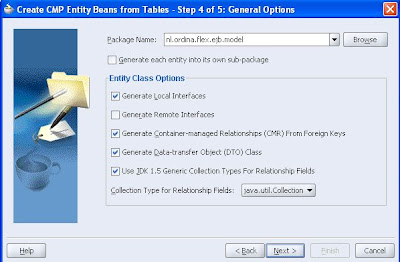

For the EJB version I use Enterprise JavaBeans 2.1 option. The Oracle table I will use in this entity bean is the employee table of the HR schema.

Now we can create a Session Bean
If we look at the properties of the session bean we see the retrieveAllEmployees method. We will use this to display all the employees in flex.

We are ready to add the blazeds libraries to the viewcontroller project. Because we want to use EJB, we have to download an extra library. Here is the link of the ejb library which is made by Ryan J. Norris. Add also this library to the viewcontroller project.
Because we use ejb we have to add the embedded oc4j client and j2ee library to viewcontroller project.


Now we can configure blazeds. We have to create two files (remoting-config.xml and services-config.xml ) in WEB-INF/flex/ folder
Here is the remoting-config.xml file. In this file we define a destination with the name of the session bean in the model project.


<?xml version="1.0" encoding="UTF-8"?>
<service id="remoting-service" class="flex.messaging.services.RemotingService">
<adapters>
<adapter-definition id="java-object"
class="flex.messaging.services.remoting.adapters.JavaAdapter"
default="true"/>
</adapters>
<default-channels>
<channel ref="my-amf"/>
</default-channels>
<destination id="EmployeeEJB">
<properties>
<factory>ejb</factory>
<source>SessionEJB</source>
</properties>
</destination>
</service>

Here is the services-config.xml. In this file we define the ejb factory in my case I have to use com.adobe.ac.ejb.EJBFactory for ejb3 we have to use com.adobe.ac.ejb.EJB3Factory as factory class.

<?xml version="1.0" encoding="UTF-8"?>
<services-config>
<services>
<service-include file-path="remoting-config.xml"/>
<default-channels>
<channel ref="my-amf"/>
</default-channels>
</services>
<factories>
<factory id="ejb" class="com.adobe.ac.ejb.EJBFactory" />
</factories>
<channels>
<channel-definition id="my-amf"
class="mx.messaging.channels.AMFChannel">
<endpoint url="http://{server.name}:{server.port}/{context.root}/messagebroker/amf"
class="flex.messaging.endpoints.AMFEndpoint"/>
<properties>
<polling-enabled>false</polling-enabled>
</properties>
</channel-definition>
</channels>

<logging>
<target class="flex.messaging.log.ConsoleTarget" level="Error">
<properties>
<prefix>[Flex] </prefix>
<includeDate>false</includeDate>
<includeTime>false</includeTime>
<includeLevel>false</includeLevel>
<includeCategory>false</includeCategory>
</properties>
</target>
</logging>
</services-config>

Add the blazeds servlet to the web.xml

<servlet>
<servlet-name>MessageBrokerServlet</servlet-name>
<servlet-class>flex.messaging.MessageBrokerServlet</servlet-class>
<init-param>
<param-name>services.configuration.file</param-name>
<param-value>/WEB-INF/flex/services-config.xml</param-value>
</init-param>
<load-on-startup>1</load-on-startup>
</servlet>

<servlet-mapping>
<servlet-name>MessageBrokerServlet</servlet-name>
<url-pattern>/messagebroker/*</url-pattern>
</servlet-mapping>

<listener>
<listener-class>flex.messaging.HttpFlexSession</listener-class>
</listener>

The last step in jdeveloper is to add -Doc4j.jmx.security.proxy.off=true to the run options of the viewcontroller project.

Let's open Flex builder 3 and create a new project.

We have to select j2ee server technology.

The second step is to add the webapp url's.
The mxml is very simple. First we add a remoteobject, then we are calling theretrieveAllEmployees method when the application is loaded and at last we display the result in a datagrid.

<?xml version="1.0" encoding="utf-8"?>
<mx:Application xmlns:mx="http://www.adobe.com/2006/mxml"
width="1155" height="206.21213">
<mx:applicationComplete>
srv.retrieveAllEmployees()
</mx:applicationComplete>

<mx:RemoteObject id="srv" showBusyCursor="true"
destination="EmployeeEJB"/>
<mx:DataGrid width="1104.6212"
dataProvider="{srv.retrieveAllEmployees.lastResult}"
height="140.98485"/>

</mx:Application>

Here the result. That's all.

Saturday, April 19, 2008

Flex and web services using blazeds

I had a request how you can use a web service created with JDeveloper and use it in a flex client. For this I use blazeds (it acts like a proxy), this is not really necessary because you can call the web service from an other domain directly from flex if you use the crossdomain xml.
In this blog I use a normal java class and create with jdeveloper (I use the right mouse button on this class ) a java web service. In the wizard I also check the rest property so I can call this web service as a rest service. This is how the java class looks.

package nl.ordina.ws;

import java.util.ArrayList;
import java.util.List;
import javax.jws.WebService;
import oracle.webservices.annotations.Deployment;

@WebService(name = "CitiesService")
@Deployment(restSupport = true)
public class Cities {
public Cities() {
}
public List getCities(String countryCode) {
List result = new ArrayList();
if ( countryCode.equalsIgnoreCase("nl") ) {
City c = new City();
c.setCountry("NL");
c.setName("PUTTEN");
result.add(c);
City c2 = new City();
c2.setCountry("NL");
c2.setName("AMSTERDAM");
result.add(c2);
} else if ( countryCode.equalsIgnoreCase("de") ) {
City c = new City();
c.setCountry("DE");
c.setName("BERLIN");
result.add(c);
City c2 = new City();
c2.setCountry("DE");
c2.setName("FRANKFURT");
result.add(c2);
} else {
City c = new City();
c.setCountry(countryCode);
c.setName("NOT FOUND");
result.add(c);
}
return result;
}
}

It has a method getCities with one parameter countryCode and it returns arraylist with cities.
I can run the rest webservice by /CitiesServiceSoapHttpPort/getCities?countryCode=nl
with the following result

<ns0:getCitiesResponse xmlns:ns0="http://ws.ordina.nl/">
<ns0:return xsi:type="ns1:arrayList" xmlns:xsi="http://www.w3.org/2001/XMLSchema-instance">
<ns1:item xsi:type="ns0:City" xmlns:ns1="http://www.oracle.com/webservices/internal/literal">
<ns0:country>NL</ns0:country>
<ns0:name>PUTTEN</ns0:name>
</ns1:item>
<ns1:item xsi:type="ns0:City" xmlns:ns1="http://www.oracle.com/webservices/internal/literal">
<ns0:country>NL</ns0:country>
<ns0:name>AMSTERDAM</ns0:name>
</ns1:item>
</ns0:return>
</ns0:getCitiesResponse>

This is the web service call

<soap:Body xmlns:ns1="http://ws.ordina.nl/">
<ns1:getCities>
<ns1:countryCode>NL</ns1:countryCode>
</ns1:getCities>
</soap:Body>

result envelope

<env:Envelope
xmlns:env="http://schemas.xmlsoap.org/soap/envelope/"
xmlns:xsd="http://www.w3.org/2001/XMLSchema"
xmlns:xsi="http://www.w3.org/2001/XMLSchema-instance"
xmlns:ns0="http://ws.ordina.nl/"
xmlns:ns1="http://www.oracle.com/webservices/internal/literal">
<env:Body>
<ns0:getCitiesResponse>
<ns0:return
xsi:type="ns1:arrayList">
<ns1:item
xsi:type="ns0:City">
<ns0:country>NL</ns0:country>
<ns0:name>PUTTEN</ns0:name>
</ns1:item>
<ns1:item
xsi:type="ns0:City">
<ns0:country>NL</ns0:country>
<ns0:name>AMSTERDAM</ns0:name>
</ns1:item>
</ns0:return>
</ns0:getCitiesResponse>
</env:Body>
</env:Envelope>

Now we know how the result look like, this is important for displaying the result in Flex
Let's look at the flex configuration xml, First the services-config.xml which import the proxy-config.xml

<?xml version="1.0" encoding="UTF-8"?>
<services-config>
<services>
<service-include file-path="proxy-config.xml" />

<default-channels>
<channel ref="my-amf"/>
</default-channels>
</services>

<channels>
<channel-definition id="my-amf"
class="mx.messaging.channels.AMFChannel">
<endpoint url="http://{server.name}:{server.port}/{context.root}/messagebroker/amf"
class="flex.messaging.endpoints.AMFEndpoint"/>
<properties>
<polling-enabled>false</polling-enabled>
</properties>
</channel-definition>
<channel-definition id="my-http" class="mx.messaging.channels.HTTPChannel">
<endpoint url="http://{server.name}:{server.port}/{context.root}/messagebroker/http" class="flex.messaging.endpoints.HTTPEndpoint"/>
</channel-definition>

</channels>

<logging>
<target class="flex.messaging.log.ConsoleTarget" level="Debug">
<properties>
<prefix>[Flex] </prefix>
<includeDate>false</includeDate>
<includeTime>false</includeTime>
<includeLevel>false</includeLevel>
<includeCategory>false</includeCategory>
</properties>
</target>
</logging>
</services-config>

The proxy-config.xml has two definitions one for the rest service and one for the web service.

<?xml version="1.0" encoding="UTF-8"?>
<service id="proxy-service" class="flex.messaging.services.HTTPProxyService">

<properties>
<connection-manager>
<max-total-connections>100</max-total-connections>
<default-max-connections-per-host>2</default-max-connections-per-host>
</connection-manager>
<allow-lax-ssl>true</allow-lax-ssl>
</properties>

<default-channels>
<channel ref="my-http"/>
<channel ref="my-amf"/>
</default-channels>

<adapters>
<adapter-definition id="http-proxy" class="flex.messaging.services.http.HTTPProxyAdapter" default="true"/>
<adapter-definition id="soap-proxy" class="flex.messaging.services.http.SOAPProxyAdapter"/>
</adapters>

<destination id="ws-rest-cities">
<properties>
<url>http://{server.name}:{server.port}/flex_ws-ws-context-root/CitiesServiceSoapHttpPort/getCities?</url>
</properties>
</destination>
<destination id="ws-cities">
<properties>
<wsdl>http://{server.name}:{server.port}/flex_ws-ws-context-root/CitiesServiceSoapHttpPort?WSDL</wsdl>
<soap>*</soap>
</properties>
<adapter ref="soap-proxy"/>
</destination>
</service>

We are ready for flex application, make sure you select the j2ee server.

<?xml version="1.0" encoding="utf-8"?>
<mx:Application xmlns:mx="http://www.adobe.com/2006/mxml" backgroundColor="#FFFFFF">

<mx:Script>
<![CDATA[
import mx.rpc.events.ResultEvent;

[Bindable]
private var items:ArrayCollection;

private function resultHandler(event:ResultEvent):void {
if ( event.result != null ) {
// ws
items= event.result.item;
// this is for the rest service
if ( items == null ) {
items= event.result.getCitiesResponse['return'].item;
}
grid1.dataProvider=items;
}
}
]]>
</mx:Script>

<mx:HTTPService id="ws_rest"
destination="ws-rest-cities"
result="resultHandler(event)"
useProxy="true"
showBusyCursor="true">
<mx:request>
<countryCode>{country.selectedItem.data}</countryCode>
</mx:request>
</mx:HTTPService>


<mx:WebService id="ws"
destination="ws-cities"
result="resultHandler(event)"
useProxy="true"
showBusyCursor="true">
<mx:operation name="getCities">
<mx:request>
<countryCode>{country.selectedItem.data}</countryCode>
</mx:request>
</mx:operation>
</mx:WebService>

<mx:Form label="Search geonames" id="form" width="332">
<mx:FormItem label="Country">
<mx:ComboBox id="country" width="150">
<mx:dataProvider>
<mx:ArrayCollection>
<mx:source>
<mx:Object label="Netherlands" data="NL"/>
<mx:Object label="Germany" data="DE"/>
</mx:source>
</mx:ArrayCollection>
</mx:dataProvider>
</mx:ComboBox>
</mx:FormItem>
<mx:Button label="Get Data with WS Rest" click="ws_rest.send()"/>
<mx:Button label="Get Data with WS" click="ws.getCities()"/>
</mx:Form>

<mx:DataGrid id="grid1" width="337" height="175">
<mx:columns>
<mx:DataGridColumn dataField="country" headerText="country"/>
<mx:DataGridColumn dataField="name" headerText="city"/>
</mx:columns>
</mx:DataGrid>


</mx:Application>

I use for the rest web service mx:HTTPService and mx:request to add the parameter countryCode and for the web service I use mx:WebService with the mx:operation getCities and use mx:request to add the parameter countryCode. To handle the result I made resultHandler in actionscript.
This how the flex app looks like.

Here is the jdeveloper and flex example code

Sunday, March 30, 2008

Flex drag and drop tree with blazeds in JDeveloper 10.1.3

In this blog I will show you how you can make a custom Flex drag and drop tree in any jsf page where you can drag for example an employee to another department. If you drag an employee to an another department then flex component gives the remote object
method the new department name and with the help of blazeds and ADF BC4J I can update the employee with the new department id. To make the flex tree more flashy, I added a search bar, collapse and expand all button and a tree item click function. Other
features are, a special icon if the employee is a manager and more important you can only drag an employee to a department not between the departments. The departments
employees tree look like this but you can easily customize it. In JDeveloper 11G there is support for dnd ( see my previous blog ) but within in tree and with transactions it can be very complex. Here some pictures.


For using blazeds with jdeveloper and Adobe Flex see my previous blog
This is how the xml looks like which I pass as document ( from the remote object to the flex component). The tree component uses this xml to build the tree. With the type attribute I know what type the tree items is and the label is show in the tree.
To make this work I had to xalan library to the project and put it on the top of the needed libraries, so the xmlparserv2 lib is not loaded first.


This is the needed configuration for blazeds, These xml's are located in WEB-INF/flex/

remoting-config.xml

services-config.xml


Now we can work on the java side. It has three methods, the first (getDept) is to generate the xml for the tree. The second (setNewDept) is update the employee with the new department and the last (showCurrent) is when the user click on a tree item.

public Document getDept() {

Document xmldoc= new DocumentImpl();

Element e = null;
Element ee = null;

// Root element.
Element root = xmldoc.createElementNS(null, "root");
root.setAttributeNS(null, "type", "root");

DeptViewImpl view = am.getDeptView();
view.executeQuery();
while (view.hasNext()) {
DeptViewRowImpl row = (DeptViewRowImpl)view.next();
e = xmldoc.createElementNS(null, "department");
e.setAttributeNS(null, "id" ,row.getDeptno().toString() );
e.setAttributeNS(null, "label",row.getDname());
e.setAttributeNS(null, "type", "dept");

RowIterator empRows = row.getEmpView();
while (empRows.hasNext()) {
EmpViewRowImpl row2 = (EmpViewRowImpl)empRows.next();
ee = xmldoc.createElementNS(null, "employee");
ee.setAttributeNS(null, "id" ,row2.getEmpno().toString() );
ee.setAttributeNS(null, "label",row2.getEname());
ee.setAttributeNS(null, "type" ,"emp");
// check is the employee is a manager
RowIterator empRows2 = row2.getManagerEmpView();
if ( empRows2.hasNext() ) {
ee.setAttributeNS(null, "icon" ,"myManagerIcon");
}
e.appendChild(ee);
}
root.appendChild(e);
}
xmldoc.appendChild(root);

return xmldoc;
}


public Document setNewDept(Integer department, Integer employee) {
System.out.println(" new department "+ department.toString()+ " employee "+employee.toString());
EmpViewImpl view = am.getEmpView();
view.setid(employee);
view.executeQuery();
EmpViewRowImpl row = (EmpViewRowImpl)view.next();
row.setDeptno(new Number(department.intValue()));
am.getDBTransaction().commit();
return getDept();
}

public void showCurrent( Integer id, String type) {
System.out.println("type "+type+" id "+id.toString());
}


Now we can make a flex project. In this are three important function the first is dragOverHandler, this enabled or disables the drop of the employee. The second is the dragDropHandler, this function handles the drop and calls the remote object to updat e the employee and the last is the dragEnterHandler which stores the dragged employees.


At last we can add the object to jsf page


Here are the sources to build your own dnd tree.