This way you add the MySQL database on the same machine as your WebLogic Domain without taking a lot of machine resources, less maintenance or thinking about licensing costs.
In this blogpost I will show you the steps how to create a MDS repository for OWSM and ADF.
First we start with downloading MySQL 5.5 and install it on a machine. I will use InnoDb as database engine and UTF8 as character set ( this is probably best tested by Oracle).
Add or change the following database settings in the my.cnf of the MySQL database.
innodb_file_per_table
innodb_file_format=Barracuda
innodb_large_prefix
log_bin_trust_function_creators
sql-mode=NO_BACKSLASH_ESCAPES
max_sp_recursion_depth=10
The first 4 settings are required by the RCU installer ( Repository Creation Utility )The sql-mode is necessary in OWSM else you will get a SQL error ( escape ' \' on a like ) when you start the WebLogic Domain.
the max_sp_recursion_depth=10 else you will get this error Recursive limit 0 (as set by the max_sp_recursion_depth variable) was exceeded for routine mds_internal_createPackageRecursive
Start the RCU installer and select MySQL Database as database type. I will use root as username cause it needs to create a table ( schema_version_registry) in the test database and it wants to create a new database.

MySQL does not support all options but for us, the Metadata Services option is enough. Besides MDS, MySQL is also supports ODI ( Oracle Data Integrator ) and Enterprise Performance Management, I personally don't know these products so I can't test them for you .

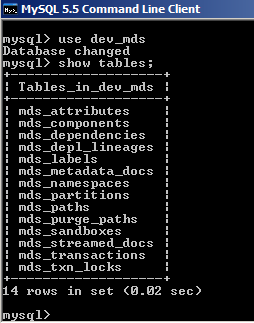
RCU creates a dev_mds database and an user dev_mds user.


It will create the following tables


Now we can start the OWSM WebLogic domain and deploy our protected Web Services.
We can also use it in ADF, for this we need to open the Enterprise Manager application, select your domain and go to Metadata Repositories. Click on Register.

I create a new MySQL user which has access to the test and dev_mds database.
grant all on dev_mds.* to mds@'%' identified by 'welcome';
grant all on test.* to mds@'%' identified by 'welcome';
the test database contains the RCU schema_version_registry table which contains all the entries.
use mds as username and test as service name.


Hi, I tried the above mentioned procedure to configure MySQL db in the RCU. However, in the screen wher eit asks for database type, host ,port, , database name, username,password, after filling up all these i get the following error
ReplyDeleteAccess denied for user 'root'@'localhost'(using password:'YES')
what might I be missing here?
Hi,
Deletein mysql you can create db users which are connected to a machine. when you create a new user with % instead of localhost , then it should work from every machine like this
CREATE USER 'jeffrey'@'%' IDENTIFIED BY 'mypass';
GRANT ALL ON *.* TO 'jeffrey'@'%';
thanks
Edwin :
ReplyDeleteI'm using MySQL Community Server 5.5.34 .
I copied their my_innodb-heavy-4G.ini to my.ini and
added the 6 lines you recommended at the end of the [msqld] group (just be [mysqldump].
With this version, that would be line # 453.
Anyways, I'm using ADF Essentials WebLogic Server's 12.1.2 RCU and
I still see basically the same error messages.
Does the fix you describe apply to the Community Edition ?
Michael
Illinois, USA
Hi,
DeleteYou also got these errors?, then I think those settings are not picked up, Can you retrieve all the parameters from mysql and see if these parameters are active.
I tested it with 11g PS5, maybe they changed something but I think it should also work for 12.1.2.
Thanks
es, I am still getting these errors.
DeleteHowever, I now have some additional information that may help demystify what is going on here.
To ensure MySQL initialization is seeing the my.ini file,
I put it in the install directory, the first place MySQL looks
( and I don't use the mysqld "--defaults-extra-file=" option ).
When I first posted, I assumed that if MySQL initialization
encountered "Warning"s or "ERROR", it would abort instead
proceding with " ready for internet connections ".
However, I see this is exactly what is happening.
Wow. That's downright Amazing.
Here it is...
..............................
>mysqld --console
131104 11:28:12 [Warning] Using unique option prefix myisam_recover instead of myisam-recover-options is deprecated and will be removed in a future release. Please use the full name instead.
131104 11:28:12 [Note] Plugin 'FEDERATED' is disabled.
131104 11:28:12 InnoDB: The InnoDB memory heap is disabled
131104 11:28:12 InnoDB: Mutexes and rw_locks use Windows interlocked functions
131104 11:28:12 InnoDB: Compressed tables use zlib 1.2.3
131104 11:28:12 InnoDB: Initializing buffer pool, size = 2.0G
131104 11:28:13 InnoDB: Completed initialization of buffer pool
InnoDB: Error: log file .\ib_logfile0 is of different size 0 5242880 bytes
InnoDB: than specified in the .cnf file 0 268435456 bytes!
131104 11:28:13 [ERROR] Plugin 'InnoDB' init function returned error.
131104 11:28:13 [ERROR] Plugin 'InnoDB' registration as a STORAGE ENGINE failed.
131104 11:28:13 [Note] Server hostname (bind-address): '0.0.0.0'; port: 3306
131104 11:28:13 [Note] - '0.0.0.0' resolves to '0.0.0.0';
131104 11:28:13 [Note] Server socket created on IP: '0.0.0.0'.
131104 11:28:13 [Note] Event Scheduler: Loaded 0 events
131104 11:28:13 [Note] mysqld: ready for connections.
Version: '5.5.34-log' socket: '' port: 3306 MySQL Community Server (GPL)
.........................
To resolve the first error regarding "log file .\ib_logfile0"", I first tried changing
“innodb_log_file_size=256M” to "innodb_log_file_size=512M" but that didn't work
and so I commented it out... #innodb_log_file_size=512M.
That worked (but clearly I am shooting in the dark here).
The subsequent ERROR(s) persisted...
131104 12:02:41 [ERROR] Plugin 'InnoDB' init function returned error.
131104 12:02:41 [ERROR] Plugin 'InnoDB' registration as a STORAGE ENGINE failed
Next, I took my.ini with your 6 modifications out of the picture by renaming it.
Then I copied MySQL's my_innodb-heavy-4G.ini to my.ini and I see the same problem.
I must confess that my PC does NOT have 4GB of memory, just 3GB.
Not sure if this is an issue.
So, what happens if we google for "[ERROR] Plugin 'InnoDB' init function returned error"
I'll take a look at these...
http://forums.mysql.com/read.php?22,144428,241055
https://bbs.archlinux.org/viewtopic.php?id=160277
" I just deleted the files /var/lib/mysqld/ib_logfile0 and /var/lib/mysql/ib_logfile1 "
Edwin, was your starting point also with MySQL's my_innodb-heavy-4G.ini ?
Michael
Illinois, USA
MOSTLY RESOLVED...
DeleteThe file named my.ini requires " [mysqld] ".
Here is the contents of my my.ini file...
# M I C H A E L ******
# additions Per http://biemond.blogspot.com/2012/02/use-mysql-55-as-mds-database-repository.html
[mysqld]
innodb_file_per_table
innodb_file_format=Barracuda
innodb_large_prefix
log_bin_trust_function_creators
sql-mode=NO_BACKSLASH_ESCAPES
max_sp_recursion_depth=10
Then, MySQL initialization is clean ( no warning and no errors )...
>mysqld --console
131104 14:01:32 [Note] Plugin 'FEDERATED' is disabled.
131104 14:01:32 InnoDB: The InnoDB memory heap is disabled
131104 14:01:32 InnoDB: Mutexes and rw_locks use Windows interlocked functions
131104 14:01:32 InnoDB: Compressed tables use zlib 1.2.3
131104 14:01:32 InnoDB: Initializing buffer pool, size = 128.0M
131104 14:01:32 InnoDB: Completed initialization of buffer pool
131104 14:01:32 InnoDB: highest supported file format is Barracuda.
131104 14:01:33 InnoDB: Waiting for the background threads to start
131104 14:01:34 InnoDB: 5.5.34 started; log sequence number 1595675
131104 14:01:34 [Note] Server hostname (bind-address): '0.0.0.0'; port: 3306
131104 14:01:34 [Note] - '0.0.0.0' resolves to '0.0.0.0';
131104 14:01:34 [Note] Server socket created on IP: '0.0.0.0'.
131104 14:01:34 [Note] Event Scheduler: Loaded 0 events
131104 14:01:34 [Note] mysqld: ready for connections.
Version: '5.5.34' socket: '' port: 3306 MySQL Community Server (GPL)
So, for the record,
it " seems " like I was able to use ADF Essentials WebLogic Server 12.1.2's RCU
on top of MySQL Version 5.5.34.
First I just had to set the password for user root in MySQL.
Then create a my.ini as discussed above.
NOTE: Wthout the [mysqld] in the my.ini file, the problem did not resolve itself
( and led to me trying to use MySQL's " my_innodb-heavy-4G.ini " file
as a starting point for my.ini and that led to similar and additional problems ).
--------------------------------------------------------
MORE...
While running RCU, I saved the screen captures.
But where is this database & schema directories ?
Eventually, I browsed to an unlikely place and found 3 directories created there...
c:\Program Files\MySQL\mysql-5.5.34\data: dir dev*
11/04/2013 04:40 PM DIR dev_mds
11/04/2013 02:26 PM DIR dev_stb
11/04/2013 04:40 PM DIR dev_wls
0 File(s) 0 bytes
3 Dir(s) 376,020,185,088 bytes free
I don't recall MySQL installation prompting my for a data location.
I would not have chose a MySQL installation directory.
Is there a way to change this ?
If one desires the ADF Essentials WebLogic Server configuration,
are these, DEV_MDS, DEV_STB and DEV_WLS, the correct schema choices ?
I want to use an ADF Essentials type of encironment testing with JDeveloper
( because JDeveloper's WebLogic Server includes the entire ADF Framework).
Does what I'm doing make sense ?
And, I'm having difficulties using MySQL prompt to verify the were created...
mysql> show tables;
+--------------------------+
| Tables_in_test |
+--------------------------+
| schema_version_registry |
| schema_version_registry$ |
+--------------------------+
2 rows in set (0.00 sec)
mysql> use dev_mds
ERROR 1044 (42000): Access denied for user ''@'localhost' to database 'dev_mds'
I'll start browing MySQL documentation.
The other questions I have...
I don't think the answers can be found in Oracle's documentation and so, I think I have to ask.
Michael
Illinois, USA
>mysql -u root -p test
ReplyDeleteEnter password: ****
mysql> show databases;
+--------------------+
| Database |
+--------------------+
| information_schema |
| dev_mds |
| dev_stb |
| dev_wls |
| mysql |
| performance_schema |
| test |
+--------------------+
7 rows in set (0.00 sec)
mysql>
Looks good to me :-|
Great ,
Deleteyou did it.
Hi I want to share my experience about how to set when we faced such a situation
ReplyDeleteRCU-6002:The specified database does not meet the minimum requirement to load metadata repository.
RCU-6080:Global prerequisite check failed - Check requirement for specified database
The database you are connecting to, is a more recent than the supported version. Refer to the certification matrix for supported DB versions.
DB Init Param Prerequisite failure for INNODB_FILE_FORMAT. Its value should be 'Barracuda'.
DB Init Param Prerequisite failure for INNODB_LARGE_PREFIX. Its value should be 'ON'.
DB Init Param Prerequisite failure for LOG_BIN_TRUST_FUNCTION_CREATORS. Its value should be 'ON'.
We should write these codes in mysql command line
mysql>SET GLOBAL innodb_file_format=barracuda;
mysql>SET GLOBAL innodb_file_per_table=ON;
mysql>SET GLOBAL innodb_large_prefix=ON;
mysql>SET GLOBAL log_bin_trust_function_creator=ON;
Dear All,
ReplyDeletemysqld Ver 5.6.19 for Linux on x86_64 (MySQL Community Server (GPL)
OS: RedHat Linux 7
Oracle Fusion Middleware 12c
-------------------------------------------------------------------
I tried both:
Added the following database settings in the my.cnf of the MySQL database.
innodb_file_per_table
innodb_file_format=Barracuda
innodb_large_prefix
log_bin_trust_function_creators
sql-mode=NO_BACKSLASH_ESCAPES
max_sp_recursion_depth=10
---------------------------------------------
and
Wrote these codes in mysql command line
mysql>SET GLOBAL innodb_file_format=barracuda;
mysql>SET GLOBAL innodb_file_per_table=ON;
mysql>SET GLOBAL innodb_large_prefix=ON;
mysql>SET GLOBAL log_bin_trust_function_creator=ON;
----------------------------------------------------------------------------
But still i get these errors:
RCU-6002:The specified database does not meet the minimum requirement to load metadata repository.
RCU-6080:Global prerequisite check failed - Check requirement for specified database
The selected database was released after this version of Oracle Fusion Middleware. For the most recent list of certified databases, refer to the Supported System Configurations information on the Oracle Technology Network.
DB Init Param Prerequisite failure for innodb_file_format. Its value should be 'Barracuda'.
DB Init Param Prerequisite failure for innodb_large_prefix. Its value should be 'ON'.
DB Init Param Prerequisite failure for log_bin_trust_function_creators. Its value should be 'ON'.
----------------------------------------------------------------------------------------
Please help.
Thanks and Regards
If i put this in wrong place,i'm going to say sorry.
ReplyDeleteI am totally new to ,so i have to come here to find solutions from you guys.
I'm using Directadmin; It has been while that I m getting this error (knowing that mysqld is running):
Error connecting to MySQL: Can't connect to local MySQL server through socket '/var/lib/mysql/mysql.sock' (13)
Wuld you please indicate me what is exactly the issue ( meaning of the "(13)" ) , and possible solution, thanks.
Labels: MySQL MDS JAVA Barcode Database FMW Repository