Pages

Saturday, February 25, 2012

Use MySQL 5.5 as MDS database repository in FMW 11g R1 PS5

One of the new features of Fusion Middleware 11G R1 PatchSet 5 (PS5) is the support for MySQL 5.5 as Meta Data Services (MDS) repository. This means you can use MySQL database as a store for ADF personifications or as policies store for your OWSM domain. For MDS you just need a small database which store these configurations. For the SOA infra repository ( not supported on MySQL )  I think the Oracle Database will always be the best choice ( tuning, transactions, RAC ).
This way you add the MySQL database on the same machine as your WebLogic Domain without taking a lot of machine resources, less maintenance or thinking about licensing costs.

In this blogpost I will show you the steps how to create a MDS repository for OWSM and ADF.  

First we start with downloading MySQL 5.5 and install it on a machine. I will use InnoDb as database engine and UTF8 as character set ( this is probably best tested by Oracle).

Add or change the following database settings in the my.cnf of the MySQL database.


innodb_file_per_table
innodb_file_format=Barracuda
innodb_large_prefix
log_bin_trust_function_creators

sql-mode=NO_BACKSLASH_ESCAPES
max_sp_recursion_depth=10

The first 4 settings are required by the RCU installer ( Repository Creation Utility )
The sql-mode is necessary in OWSM else you will get a SQL error ( escape ' \'  on a like ) when you start the WebLogic Domain.
the max_sp_recursion_depth=10 else you will get this error Recursive limit 0 (as set by the max_sp_recursion_depth variable) was exceeded for routine mds_internal_createPackageRecursive

Start the RCU installer and select MySQL Database as database type. I will use root as username cause it needs to create a table ( schema_version_registry)  in the test database  and it wants to create a new database.


MySQL does not support all options but for us, the Metadata Services option is enough. Besides MDS, MySQL is also supports ODI ( Oracle Data Integrator ) and Enterprise Performance Management, I personally don't know these products so I can't test them for you .


RCU creates a dev_mds database and an user dev_mds user.


It will create the following tables
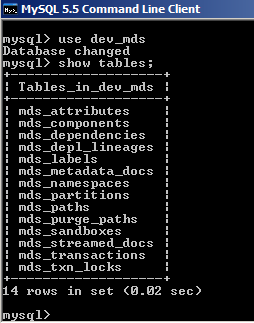

For OWSM, I also created a dev1_mds database with the RCU which I will use in the WebLogic Domain creation ( EM, JRF and OWSM as domain options ) . I used the dev1_mds as database and DEV1_MDS as MySQL username


Now we can start the OWSM WebLogic domain and deploy our protected Web Services.

We can also use it in ADF, for this we need to open the Enterprise Manager application, select your domain and go to Metadata Repositories. Click on Register.


I create a new MySQL user which has access to the test and dev_mds database.


grant all on dev_mds.* to mds@'%' identified by 'welcome';
grant all on test.* to mds@'%' identified by 'welcome';

the test database contains the RCU schema_version_registry table which contains all the entries.

use mds as username and test as service name.


Now you can register  you own MDS database repository.


That's all.

Monday, February 20, 2012

Configure WebLogic Resource Adapters with ANT

When you use a JCA adapter in Oracle SOA Suite or OSB then you know that you need to configure a plan of some WebLogic Resource Adapter.  With this ANT script I tried to make this an easy task for you and which you can repeat on different WebLogic Domains. This ANT script can easily add multiple EIS entries to the following adapters: DbAdapter, AqAdapter and JmsAdapter in just one run. After these changes to the resource plans this script will redeploy only the changed Resource Adapter.

Special thanks for my colleague Michel Schildmeijer for inspiring me to make this flexible script and off course for the necessary WLST code.

Important to know.

  • Run this script on the AdminServer, else it won't find the Resource Adapter Plans
  • First you need to create a Plan for the 3 Resource Adapters (Db,Aq,Jms) and add a dummy entry, think how you name it and where you put it.
  • When a plan is changed and you have a soa cluster or the soa weblogic instance is running on a different server then you need to copy the plan to all servers or put it on a shared storage.    

If you don't like this then you can always create new Resource Adapters by following this blogpost.

Let's explain how it works

first you need to change some variables in this build.properties

default this scripts runs against the weblogic dev settings.  You can change this to your own and configure the dev entries ( dev entries at the bottom of the build.properties )

wls.environment=dev

Where are the adapter rars located in your FMW domain, this can be in your SOA or OSB Home of the FMW domain.
connectorLocation=C:/oracle/MiddlewarePS3/Oracle_SOA1/soa/connectors/

Then add your own EIS entries, these ones in this var will be added to weblogic.
resourceAdapterEntries=hrDB,hrAQ,cf1JMS,cf2JMS

Think if you need to set the XA or Not XA datasource property or in Jms the connectionFactoryLocation.
# AQ entry
hrAQ.type=aq
hrAQ.eisName=eis/AQ/hr2
hrAQ.property=xADataSourceName
hrAQ.value=jdbc/hrDS

# DB entry
hrDB.type=db
hrDB.eisName=eis/DB/hr2
hrDB.property=dataSourceName
hrDB.value=jdbc/hrDS

# JMS entries
cf1JMS.type=jms
cf1JMS.eisName=eis/JMS/hr3
cf1JMS.property=ConnectionFactoryLocation
cf1JMS.value=jms/MyCF

After you can run the ANT script 
ant -f build.xml createResourceAdapterEntries 

Here you can download the code on github

Here is the whole build.properties file 


The wlst part with the wlRedeployResourceAdapter and wlCreateResourceAdapter macrodefs


And at last the build.xml

Saturday, February 18, 2012

Identity propagation with OWSM

OWSM allows you to pass on the identity of the authenticated user to your OWSM protected web service ( thanks to OPSS ), this username can then be used by your service. This will work on one or between different WebLogic domains.
For example on the client side you can have an web application which uses ADF Security or Container security, the application calls an web service with the help of a ws proxy client or an ADF ws datacontrol. The web service can be a SOA Suite, OSB proxy or a JAX-WS service.
To make this work we need to use SAML policies, SAML allows us to do identity propagation, other policies won't work because you need to have the password of the authenticated user which you don't have.
Before I show you, how this works, you need to have a SAML OWSM environment, I already did this in this blogpost Do SAML with OWSM , in this I generated some keystores and configured OWSM  on all the WebLogic domains and deployed a web service which has the oracle server wss11_saml_token_with_message_protection_service_policy. In my case I used JAX-WS but it also works on SOA Suite and OSB. When you want to do this on different WebLogic domains then you need to make sure that the user identities exists on both domains ( or you can enable virtual users ).
On the client side which will be in this case an ADF Web Application which is protected by ADF Security. In this application I will use a ADF WS Datacontrol on which we will add the SAML client policy wss11_saml_token_with_message_protection_client_policy.

Create the ADF WS Datacontrol. Select the DataControls.dcx file and select the service in the Structure window.

 Click on "Define Web Service Security".


Select oracle/wss11_saml_token_with_message_protection_client_policy in the security Tab


Override Properties,
these settings will work on the SOA Suite server, if you want to use this on the saml server then you need to use www.amis.nl as saml.issuer.name and samlkey as keystore.recipient.alias.


Deploy the application to the WebLogic Server and you are ready to go.