Pages

Showing posts with label SOA. Show all posts

Thursday, August 7, 2014

Create with WLST a SOA Suite, Service Bus 12.1.3 Domain

When you want to create a 12.1.3 SOA Suite, Service Bus Domain, you have to use the WebLogic config.sh utility.  The 12.1.3 config utility is a big improvement when you compare this to WebLogic 11g. With this I can create some complex cluster configuration without any after configuration.
But if you want to automate the domain creation and use it in your own (provisioning) tool/script then you can use the following scripts to create a normal SOA Suite, Service Bus domain together with BPM, BAM & the Enterprise scheduler options.

Off course!!! use this script only for development, do some intensive testing on this domain and don't use this script in production or acceptance ( use the supported config.sh utility).

The second part of this blog we will create a cluster configuration with a WLST offline script.

Before we can start we need to have a FMW database repository.  You can use the RCU utility ( MDW_HOME/oracle_common/bin/rcu) to create one.

Enable the following options


Here you can also see the improvements in the 12c FMW domain creation like

  • ServerGroups, an easy way of assigning libraries,  applications and datasources to managed servers and clusters. It will auto-detect if a managed server is part of a cluster :-)
  • Service Table Datasource together with the getDatabaseDefaults() function, no need to change all the datasources. It will re-use the RCU configuration data.


Use this to start the creation of our domain.
MDW_HOME/oracle_common/common/bin/wlst.sh soa_domain_1213.py

Here we need to do some extra configuration like

  • Change a few datasources so they will use the Oracle XA driver

With this as output.


When you want to create a cluster configuration you can use the following script.


Friday, June 27, 2014

Maven support for 12.1.3 Service Bus & SOA Suite artifacts

With the 12.1.3 release of Oracle Service Bus and Oracle SOA Suite we finally can build all our soa projects with Maven. And this time we can do it natively without calling a utility like configjar or ANT from Maven .

We start by setting all the required variables like JAVA_HOME,M2_HOME and PATH

export JAVA_HOME=/Library/Java/JavaVirtualMachines/jdk1.7.0_45.jdk/Contents/Home/jre
export M2_HOME=/Users/edwin/apache-maven-3.0.5
export PATH=${M2_HOME}/bin:${JAVA_HOME}:$PATH

Check if maven works

mvn -v 

You can also use the maven 3.0.5 version of JDeveloper 12.1.3 located at .../oracle_common/modules/org.apache.maven_3.0.5

Next step is to populate all the maven repositories

cd  .../oracle_common/plugins/maven/com/oracle/maven/oracle-maven-sync/12.1.3

install the maven sync plugin to the local repository

mvn install:install-file -DpomFile=oracle-maven-sync-12.1.3.pom -Dfile=oracle-maven-sync-12.1.3.jar -DoracleHome=/Users/edwin/Oracle/JDevMiddleware12.1.3

Deploy all the libraries to the local mvn repository

mvn com.oracle.maven:oracle-maven-sync:push -DoracleHome=/Users/edwin/Oracle/JDevMiddleware12.1.3

update your local archetype catalog

mvn archetype:crawl -Dcatalog=$HOME/.m2/archetype-catalog.xml

Next steps are, to do the same but then we will fill the Nexus repository

Deploy the maven sync plugin to the nexus maven repository and we need to configure the maven settings.xml

mvn deploy:deploy-file -DpomFile=oracle-maven-sync-12.1.3.pom -Dfile=oracle-maven-sync-12.1.3.jar -Durl=http://localhost:8081/nexus/content/repositories/thirdparty -DrepositoryId=internal

and do a another sync

mvn com.oracle.maven:oracle-maven-sync:push


Here is the matching maven settings.xml

  <servers>
    <server>
      <id>internal</id>
      <username>admin</username>
      <password>admin123</password>
    </server>
  </servers>

  <mirrors>
    <mirror>
      <id>nexus</id>
      <name>Internal nexus Mirror of Central</name>
      <url>http://localhost:8081/nexus/content/groups/public/</url>
      <mirrorOf>*</mirrorOf>
    </mirror>
  </mirrors>

  <profiles>

    <profile>
      <id>nexus</id>
      <repositories>
        <repository>
          <snapshots>
            <enabled>true</enabled>
          </snapshots>
          <id>internal</id>
          <name>internal</name>
          <url>http://localhost:8081/nexus/content/repositories/thirdparty</url>
        </repository>
      </repositories>
    </profile> 

    <profile>
      <id>oracle-maven</id>
      <properties>
        <oracleHome>/Users/edwin/Oracle/JDevMiddleware12.1.3</oracleHome>
        <serverId>internal</serverId>
        <testOnly>false</testOnly>
        <failOnError>false</failOnError>
        <overwriteParent>true</overwriteParent>
      </properties>      
    </profile> 
  </profiles>

  <activeProfiles>
     <activeProfile>nexus</activeProfile>
     <activeProfile>oracle-maven</activeProfile>
  </activeProfiles>                     


Next step is to do a describe of the soa and osb plugin

mvn help:describe -DgroupId=com.oracle.soa.plugin -DartifactId=oracle-soa-plugin -Dversion=12.1.3-0-0

with this as output

Name: Oracle SOA Maven Plugin
Description: This plugin allows users to compile, package, deploy, test and
  undeploy SOA composites.
Group Id: com.oracle.soa.plugin
Artifact Id: oracle-soa-plugin
Version: 12.1.3-0-0
Goal Prefix: oracle-soa

This plugin has 6 goals:

oracle-soa:compile
  Description: Compiles the composite. Note that 'compiling' a composite does
    not actually produce any new files, it is really a 'validation' and
    produces only output messages.

oracle-soa:deploy
  Description: To deploy a SOA composite (supports all formats SAR, MAR,
    etc.)

oracle-soa:help
  Description: Display help information on oracle-soa-plugin.
    Call mvn oracle-soa:help -Ddetail=true -Dgoal=<goal-name> to display
    parameter details.

oracle-soa:sar
  Description: Packages the composite into a SAR.

oracle-soa:test
  Description: To execute SCA Test Suites.

oracle-soa:undeploy
  Description: Undeploy a SOA composite from a SOA managed server or cluster


mvn help:describe -DgroupId=com.oracle.servicebus.plugin -DartifactId=oracle-servicebus-plugin -Dversion=12.1.3-0-0

with this as output

Name: Oracle Service Bus - Plugin
Description: (no description available)
Group Id: com.oracle.servicebus.plugin
Artifact Id: oracle-servicebus-plugin
Version: 12.1.3-0-0
Goal Prefix: servicebus

This plugin has 2 goals:

servicebus:deploy
  Description: (no description available)

servicebus:package
  Description: (no description available)


Now we are able to create a new Service Bus project from a Maven Archetype.


Provide the all the maven details


Search for the servicebus application ArcheType and select this one


Provide the required projectName of this archetype


Create the application


Now we got a Service Bus application with 3 poms, One project with sbar as package type , System project pom and a parent pom with these 2 projects


Now we can build the Service Bus project from JDeveloper by selecting the pom and right click to start for example run the package phase.

or from a terminal by using mvn package


We can do the same for a SOA Suite application and a SOA Composite.


Search for oracle-soa-application


Now we got 2 poms ( 1 is at the workspace level )  and project packaging is now a sar.


And we can also build the soa composite.


Wednesday, January 15, 2014

REST, SSE or WebSockets on WebLogic 10.3.6

WebLogic 10.3.6 comes with Jersey1.9 and has no support for Server Side Events or WebSockets. But for one of our projects we are making a HTML5 / AngularJS application, which need to invoke some RESTful services and we also want to use of SSE or WebSockets.
Off course we can use WebLogic 12.1.2 but we already have an OSB / SOA Suite WebLogic 10.3.6 environment.

So when you want to pimp your WebLogic 11g server you can make a new shared library which has the latest version of Jersey (1.18),  Jackson, Linking and the Atmosphere Jersey module ( for  SSE & Websockets).  Atmosphere also comes with a WebLogic addon ( cause Servlet 3.0 is not supported on WebLogic 10.3.6 ).
The Atmosphere framework also supports IE 6 or higher and when SSE or WebSockets is not supported by your browser,  it automatically falls back to Long Polling.

Here you can download the shared library and it comes with a working demo Rest Service and SSE chat application.


Just deploy this war as a Library and target this to a managed server.

In a Web Application add the weblogic.xml deployment descriptor to the web-inf folder and add a reference to this shared library.


Next step is to create a Rest Application which contains references to your jersey classes.


And for example a Jersey Atmosphere SSE chat service.


And the web.xml which contains the Jersey Servlet (with Jackson and Linking) and the Atmosphere Servlet with the WebLogic servlet class. org.atmosphere.weblogic.AtmosphereWebLogicServlet


When we start or deploy this application, we should get this output

Atmosphere is using async support: org.atmosphere.weblogic.WebLogicCometSupport running under container: WebLogic Server

We can test our RESTful service


or Test Server Side Events .


Here you can download the shared library or the demo application https://github.com/biemond/weblogic_11-Jersey-Atmosphere

Friday, May 18, 2012

SOA Suite PS5 Email (UMS) Adapter

With the release of Soa Suite Patch Set 5 we can now try out the new UMS Email adapter. The UMS adapter allows you to listen for new mail or send a mail from a service component. Combined with BPEL it’s now relative easy to process email bodies or attachments.  To read more and test it yourself check my blogpost on Amis Technology.

Sunday, March 11, 2012

Handling Custom XML documents in Oracle B2B

With Oracle B2B which is a part of Oracle SOA Suite 11g R1 you can handle / interchange all kind of messages between partners. Oracle B2B supports many Documents Protocols like off course your own, EDIFACT,  HL7, RosettaNet and many more. Besides this it also supports many interchange channel protocols like AS2, Email , FTP , File etc.
B2B can listen on those channels and tries to identify the document together with the sender and the receiver. For this you need to register the document and create an Agreement between the two parties.  On the partner level you need to register some identifiers like a common name or an email address.
When the document is identified it will be translated to xml and this document can send this to an output channel, this can be a JMS Queue on which Oracle SOA Suite can listen.

In this blogpost I made a small example in which we have an employee xml message which is delivered to an folder, B2B has a listening Channel on this folder and tries to identify it ( uses xpath and examine the file name ). This particular Agreement says it has to deliver the message to a Queue.
This Queue is read by Oracle SOA Suite and the composite generates an employee response message and uses a B2B adapter to deliver it back to Oracle B2B.
The document is identified by Oracle B2B and this Agreement has email as output and the response message is delivered as an attachment in the email.

Off course this xml use case can also be done in Oracle SOA Suite but in my next blogpost we will make it more interesting by doing the same but then with an EDIFACT message where B2B can validate and transform the EDIFACT and even send an Acknowledgement based on the input message.

We start with the employee and the response schemas.

The employee schema

The employee response schema

I will use the user weblogic for all the B2B Administration so I need to assign the IntegrationAdministrators role to the weblogic user ( this can be done in the myrealm security realm).

We start by register these XSD documents in the Administration menu of the B2B application.
this is the url of the B2B application located on the soa server http://soa_server:8001/b2bconsole/faces/login.jspx

Select the Custom Document Protocol and click on the green plus button where we create a new Document Protocol Version called Employee_XSD


Save and click on the new Type button where we create a Document Type Name.


On this screen we can define our Defintion and where we need to upload the XSD.
Important for the identification of the message is that we need to provide the Identification Expression.

In this case I search for the element called type and see if it has employee2 as value.


We do the same steps for our employee response message.


Now we can move to the Partners registration part of the B2B application. Here we will create a partner, add some identifiers, register which documents can be handled by this partner and at last the output communication channel where we can define where the message will be send to.

First click on MyCompany, this is the master partner ( basically this is you, the owner of the B2B server ).

We need to define some Identifiers which can be used in the Partner Agreements.
First a Generic Identifier with MyCompany as value and an other one with server@local.nl as email address.


The Document and the roles this partner can handle, for EmployeeSchema de-select Sender and for the Response de-select Receiver.

The employee message will be delivered to a JMS Queue so we need to define an output channel. Define a JMS channel and provide the JNDI names of the Connection Factory and the JMS Queue.

We also need a Trading Partner so I created a Partner called CorpA. Here we also need to define some Generic Identifiers like CorpA and client@local.nl
 

The documents, in this case CorpA is the sender of the Employee message and receiver of Response message.


The CorpA want to receive the response as an email attachment so we need to define an email channel where we define the mail server details.


Next we need to define agreements between CorpA and MyCompany and back.
Select the CorpA Partner and create an Agreement

The incoming employee message agreement.

Here we need to select the Employee document and on the MyCompany side we need to choose the JMS channel. Click Save and Deploy the agreement.


In the response message agreement we need to use the Response document and on the CorpA side, select  the email channel.  Also on the the MyCompany side add the Email identifier so B2B knows who is the sender of the email.  Click Save and Deploy the agreement.


The next part is Oracle SOA Suite which receives the employee message and creates the response message.

Drag the B2B Adapter to the Exposed Services side of the composite.

  • Choose JMS as B2B integration type. 
  • Select your AppServer Connection -> The weblogic domain which hosts the SOA & B2B software.
  • Receive
  • Click Next on the Basic Tab
  • Open the Custom Document Definition and select the EmployeeSchema
  • Select Oracle WebLogic JMS in OEMS
  • Select your AppServer Connection -> The weblogic domain which hosts the SOA & B2B software.
  • Lookup the Queue in the Destination name.
  • Create an EIS connection with this name in the JMS Resource Adapter plan.


Drag the B2B Adapter to the External References side of the composite.

  • Choose Default as B2B integration type.
  • Select your AppServer Connection -> The weblogic domain which hosts the SOA & B2B software.
  • Send
  • Click Next on the Basic Tab
  • Open the Custom Document Definition and select the ResponseSchema


    Add an Mediator and wire the two adapters to this mediator.

    • Add a transformation where we will create the response message.
    • Add the B2B Assign Values so B2B can detect the agreement. 


    You need to provide the following Assigns

    b2b.fromTradingPartnerId -> MyCompany
    b2b.fromTradingPartnerType -> Name

    b2b.toTradingPartnerId -> CorpA
    b2b.toTradingPartnerType -> Name
    b2b.documentTypeName -> EmployeeResponseType
    b2b.documentProtocolName -> Custom

    b2b.documentProtocolVersion -> Employee_XSD


    Deploy the composite


    Back to B2B

    The last part before we can test this B2B example is to configure a listening channel which polls for new messages.

    We need to go back to the Administration Tab of the B2B application.

    Add a file channel and provide the Folder name. 
    Important we need to define a filename format so B2B can detect the sender. ( my custom document does not have an identification part )


    Now we can add a xml document to this MyCompany in folder and must be called CorpA.xml

    This is the example document with employee2 as value for the element type (else the document won't be detected).
     

     We can see the messages and the progress in the Reports part of the B2B Application.


    And the final result where we got an email with the employee response.


     In the next blogpost we will add some EDIFACT messages to B2B. 

    Monday, February 20, 2012

    Configure WebLogic Resource Adapters with ANT

    When you use a JCA adapter in Oracle SOA Suite or OSB then you know that you need to configure a plan of some WebLogic Resource Adapter.  With this ANT script I tried to make this an easy task for you and which you can repeat on different WebLogic Domains. This ANT script can easily add multiple EIS entries to the following adapters: DbAdapter, AqAdapter and JmsAdapter in just one run. After these changes to the resource plans this script will redeploy only the changed Resource Adapter.

    Special thanks for my colleague Michel Schildmeijer for inspiring me to make this flexible script and off course for the necessary WLST code.

    Important to know.

    • Run this script on the AdminServer, else it won't find the Resource Adapter Plans
    • First you need to create a Plan for the 3 Resource Adapters (Db,Aq,Jms) and add a dummy entry, think how you name it and where you put it.
    • When a plan is changed and you have a soa cluster or the soa weblogic instance is running on a different server then you need to copy the plan to all servers or put it on a shared storage.    

    If you don't like this then you can always create new Resource Adapters by following this blogpost.

    Let's explain how it works

    first you need to change some variables in this build.properties

    default this scripts runs against the weblogic dev settings.  You can change this to your own and configure the dev entries ( dev entries at the bottom of the build.properties )

    wls.environment=dev

    Where are the adapter rars located in your FMW domain, this can be in your SOA or OSB Home of the FMW domain.
    connectorLocation=C:/oracle/MiddlewarePS3/Oracle_SOA1/soa/connectors/

    Then add your own EIS entries, these ones in this var will be added to weblogic.
    resourceAdapterEntries=hrDB,hrAQ,cf1JMS,cf2JMS

    Think if you need to set the XA or Not XA datasource property or in Jms the connectionFactoryLocation.
    # AQ entry
    hrAQ.type=aq
    hrAQ.eisName=eis/AQ/hr2
    hrAQ.property=xADataSourceName
    hrAQ.value=jdbc/hrDS

    # DB entry
    hrDB.type=db
    hrDB.eisName=eis/DB/hr2
    hrDB.property=dataSourceName
    hrDB.value=jdbc/hrDS

    # JMS entries
    cf1JMS.type=jms
    cf1JMS.eisName=eis/JMS/hr3
    cf1JMS.property=ConnectionFactoryLocation
    cf1JMS.value=jms/MyCF

    After you can run the ANT script 
    ant -f build.xml createResourceAdapterEntries 

    Here you can download the code on github

    Here is the whole build.properties file 


    The wlst part with the wlRedeployResourceAdapter and wlCreateResourceAdapter macrodefs


    And at last the build.xml

    Sunday, December 18, 2011

    WebLogic SCA with WebLogic 12c and OEPE 12.1

    Fusion Middleware Software like OSB or SOA Suite is not yet available on WebLogic 12c but this does not mean you can't develop SCA Applications. With the help of the Oracle Enterprise for Eclipse 12.1.1 ( OEPE ) we can build WebLogic SCA application and deploy it on WebLogic 12c. This allows you to write Java applications using POJOs and, through different protocols, expose components as SCA services and access other components via references. You do this using SCA semantics configured in a Spring application context. In SCA terms, a WebLogic Spring SCA application is a collection of POJOs plus a Spring SCA context file that wires the classes together with SCA services and references.

    In this blogpost I will show you all the steps so you can try it yourself.

    Before we start, we need to install WebLogic 12c, configure a new domain and startup the AdminServer.
    The first step is to install the WebLogic SCA shared library and target it to the AdminServer.

    Log in to the WebLogic Console and go to deployments windows.
    Install this war  located at wlserver_12. 1\common\deployable-libraries\weblogic-sca-1.1.war as a shared library and target it to the AdminServer.

    Next step is to download OEPE 12.1.1, extract it and create a new workspace.

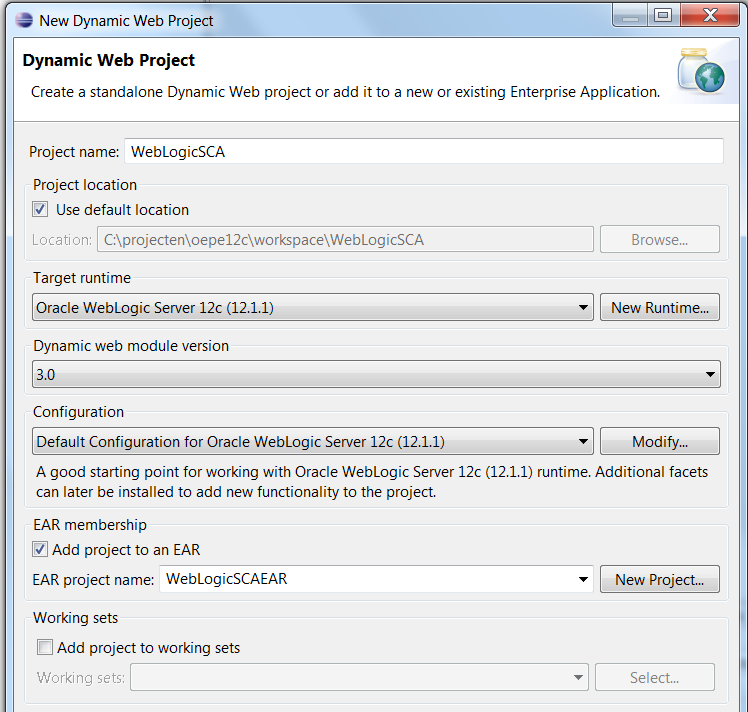
    In this workspace we need to create a new Dynamic Web Project.
    Use wls 12 as Target runtime and also create an Ear project which will include the war.


    Open the project options of your Dynamic Web Project and go to Project Facets.
    Here we need to enable Oracle WebLogic SCA and Spring.
    Click on Further configuration required.


    Next step is to download the Spring library. Click on the download button and select Spring Framework 2.5.6 of Oracle.


    Click on Next.

    We need to add the WebLogic SCA Shared Library, this will be added to the weblogic.xml deployment descriptor of your Web Project.


    You can open the weblogic.xml file of your Web project and in the Shared Libraries you should see the reference.

    When you are in the Web Perspective then you can open the spring-context.xml in the beans section of the Spring Elements.


    Or in the java perspective this is located in the jsca folder of the META-INF folder.


    In the Spring-context.xml we will add some spring beans which have an EJB & Web Service SCA service and we also add some SCA references.

    In this demo I will start with a SCA service with has a ws binding , this service has a target to a spring bean. This spring has a property to a SCA reference which an EJB binding.
    The SCA reference calls a SCA Service which off course also has an EJB binding. The service target the next spring bean which the calls the last spring bean.

    We start with the last spring bean and end with the first SCA service.
    This the LoggerOutput class which just do a system out.
    Because we want to expose the next spring bean as a SCA service we need to have an interface which we can use in the SCA service.
    And now the implementation which calls the last spring bean LoggerOutput
    Now we have everything to make our first SCA application. This is how the spring-context will look like.
    This SCA service will be invoked in the second part of this blogpost where we will call this EJB from a web service. We can use the same ILoggerComponent interface for the SCA Service ( this time a web service ) and the SCA reference will call the already created EJB SCA service. We only need a new spring bean which pass on the message to the EJB. For this I use this LoggerPassThrough class.
    Here is the total spring-context.xml
    We are ready to deploy it and do a test run. Select your EAR project, right click and do run on Server.
    Provide the details of your WebLogic 12c domain.


    You can use soapUI to invoke the SCA Web Service http://localhost:7001/WebLogicSCA/LoggerService_Uri?WSDL
    or invoke the SCA EJB Service
    ILoggerComponent logEJB = (ILoggerComponent)context.lookup("LoggerService_EJB30_JNDI");

    WebLogic also has an extension for WebLogic SCA , in the Console , go to the Preferences , Extensions and enable weblogic-sca-console.  You need to restart your WebLogic Server.

    After this you can click on your SCA deployment and see your SCA Services and references.

    Download the code at github
    https://github.com/biemond/OEPE_examples/tree/master/wls12cSCA