With Patch Set 1 of JDeveloper 11G we can push data to the JSF page. This is called
Active Data Service and this works with the following JSF component
- activeCommandToolbarButton
- activeImage
- activeOutputText
- table
- tree
- All DVT components
One requirement for this feature is you need to have a Datasource who supports data push. For example the BAM server of the Soa Suite support this. For other cases you need to use the Active Data Proxy framework. In this blog I made a demo with 3 different working examples , The first is an example of Oracle this in the fusion demo and can be
downloaded here , the second is the one of
Matthias Wessendorf and the last is the one of the Oracle ADS documentation example which works with a EJB datacontol.
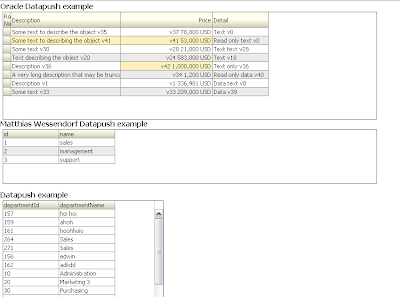
In the next weeks I will make an ADS example with EJB and JMS, The ADS Page components will then listen on a topic for EJB data change events and refreshes the page with push .
But first let me show what you need to do.
Configure the adf-config.xml , located in the .adf\META-INF folder ( workspace level). With this ADF file you can configure the push parameters, study these parameters because they can influence the application performance.
<?xml version="1.0" encoding="windows-1252" ?>
<adf-config xmlns="http://xmlns.oracle.com/adf/config"
       xmlns:sec="http://xmlns.oracle.com/adf/security/config"
       xmlns:ads="http://xmlns.oracle.com/adf/activedata/config">
<sec:adf-security-child xmlns="http://xmlns.oracle.com/adf/security/config">
<CredentialStoreContext credentialStoreClass="oracle.adf.share.security.providers.jps.CSFCredentialStore"
                       credentialStoreLocation="../../src/META-INF/jps-config.xml"/>
</sec:adf-security-child>
<ads:adf-activedata-config xmlns="http://xmlns.oracle.com/adf/activedata/config">
<!--
 transport allows three settings:
 * streaming (default)
 * polling
 * long-polling
-->
<transport>long-polling</transport>
<latency-threshold>10000</latency-threshold>
<keep-alive-interval>10000</keep-alive-interval>
<polling-interval>3000</polling-interval>
<max-reconnect-attempt-time>1800000</max-reconnect-attempt-time>
<reconnect-wait-time>10000</reconnect-wait-time>
</ads:adf-activedata-config>
</adf-config>
Then create in the .adf\META-INF folder a new folder called services and put a new file in called adf-config.properties and add the following content.
http\://xmlns.oracle.com/adf/activedata/config=oracle.adfinternal.view.faces.activedata.ActiveDataConfiguration$ActiveDataConfigCallback
Go to your JSF page and drag and drop for example departments from your datacontrol to your page. Choose a readonly table ( when you want to use inputtext instead of outputtext JSF components then keep in mind you need to reset the uicomponent else it won't get the new value ) and don't use Filtering on the table.
This is how your JSF can look like.
           <af:table value="#{bindings.departmentsFindAll.collectionModel}"
                     var="row"
                     rows="#{bindings.departmentsFindAll.rangeSize}"
                     emptyText="#{bindings.departmentsFindAll.viewable ? 'No data to display.' : 'Access Denied.'}"
                     fetchSize="#{bindings.departmentsFindAll.rangeSize}"
                     rowBandingInterval="0"
                     selectedRowKeys="#{bindings.departmentsFindAll.collectionModel.selectedRow}"
                     selectionListener="#{bindings.departmentsFindAll.collectionModel.makeCurrent}"
                     rowSelection="single" id="t3">
             <af:column sortProperty="departmentId" sortable="true"
                        headerText="#{bindings.departmentsFindAll.hints.departmentId.label}"
                        id="c8">
               <af:outputText value="#{row.departmentId}" id="ot9">
                 <af:convertNumber groupingUsed="false"
                                   pattern="#{bindings.departmentsFindAll.hints.departmentId.format}"/>
               </af:outputText>
             </af:column>
             <af:column sortProperty="departmentName" sortable="true"
                        headerText="#{bindings.departmentsFindAll.hints.departmentName.label}"
                        id="c9">
               <af:outputText value="#{row.departmentName}" id="ot8"/>
             </af:column>
           </af:table>
Here the pagedef of the page ,we need to have a handle to the departmentsFindAll tree in our Active Data Proxy framework.
<?xml version="1.0" encoding="UTF-8" ?>
<pageDefinition xmlns="http://xmlns.oracle.com/adfm/uimodel"
            version="11.1.1.55.36" id="ADStablePageDef"
            Package="nl.whitehorses.app.view.pageDefs">
<parameters/>
<executables>
<iterator Binds="root" RangeSize="25" DataControl="CountrySessionEJBLocal"
          id="CountrySessionEJBLocalIterator"/>
<accessorIterator MasterBinding="CountrySessionEJBLocalIterator"
                  Binds="departmentsFindAll" RangeSize="25"
                  DataControl="CountrySessionEJBLocal"
                  BeanClass="nl.whitehorses.model2.Departments"
                  id="departmentsFindAllIterator"/>
</executables>
<bindings>

<tree IterBinding="departmentsFindAllIterator" id="departmentsFindAll">
  <nodeDefinition DefName="nl.whitehorses.model2.Departments"
                  Name="departmentsFindAll0">
    <AttrNames>
      <Item Value="departmentId"/>
      <Item Value="departmentName"/>
    </AttrNames>
  </nodeDefinition>
</tree>
</bindings>
</pageDefinition>
Now we can make our own DepartmentModel where we add Active Data Service to it. We need the departmentsFindAll tree attribute from the pagedef.
package nl.whitehorses.app.ads;

import oracle.adf.model.BindingContext;
import oracle.adf.model.binding.DCBindingContainer;
import oracle.adf.view.rich.model.ActiveCollectionModelDecorator;

import oracle.adf.view.rich.model.ActiveDataModel;

import oracle.adfinternal.view.faces.model.binding.FacesCtrlHierBinding;


import org.apache.myfaces.trinidad.model.CollectionModel;

public class DepartmentModel   extends ActiveCollectionModelDecorator {

 private MyActiveDataModel _activeDataModel = new MyActiveDataModel();
 private CollectionModel _model = null;


 public CollectionModel getCollectionModel() {
    if (_model == null) {
        DCBindingContainer dcBindings = (DCBindingContainer)BindingContext.getCurrent().getCurrentBindingsEntry();
        FacesCtrlHierBinding treeData = (FacesCtrlHierBinding)dcBindings.getControlBinding("departmentsFindAll");
        _model = treeData.getCollectionModel();
    }
    return _model;
  }

 public ActiveDataModel getActiveDataModel() {
      return _activeDataModel;
 }

 public MyActiveDataModel getMyActiveDataModel() {
     return _activeDataModel;
 }

}
Make your own active ActiveDataModel in which we start a thread where we fire change events.
package nl.whitehorses.app.ads;

import java.util.Collection;

import java.util.concurrent.atomic.AtomicInteger;
import oracle.adf.view.rich.activedata.BaseActiveDataModel;
import oracle.adf.view.rich.event.ActiveDataUpdateEvent;

public class MyActiveDataModel extends BaseActiveDataModel
  {
    protected void startActiveData(Collection<Object> rowKeys, int startChangeCount)
    {
      _listenerCount.incrementAndGet();
      if (_listenerCount.get() == 1)
      {
        System.out.println("start up");

        Runnable dataChanger = new Runnable()
        {
          public void run()
          {
            System.out.println("MyThread starting.");
            try
            {
              Thread.sleep(2000);
              System.out.println("thread running");
              Change chg = new Change();
              chg.triggerDataChange(MyActiveDataModel.this);
            }
            catch (Exception exc)
            {
              System.out.println("MyThread exceptioned out.");
            }
            System.out.println("MyThread terminating.");
          }
        };
        Thread newThrd = new Thread(dataChanger);
        newThrd.start();
      }
    }

    protected void stopActiveData(Collection<Object> rowKeys)
    {
      _listenerCount.decrementAndGet();
      if (_listenerCount.get() == 0)
      {
        System.out.println("tear down");
      }
    }

    public int getCurrentChangeCount()
    {
      return _currEventId.get();
    }

    public void bumpChangeCount()
    {
      _currEventId.incrementAndGet();
    }

    public void dataChanged(ActiveDataUpdateEvent event)
    {
      fireActiveDataUpdate(event);
    }

    private final AtomicInteger _listenerCount = new AtomicInteger(0);
    private final AtomicInteger _currEventId = new AtomicInteger();
}
For demo purposes we send some change events. For this we need to know the Key of the department iterator and the attribute which changed. See the ADS help page for other events like insert ,delete etc..
package nl.whitehorses.app.ads;

import oracle.adf.view.rich.event.ActiveDataEntry;

import oracle.adf.view.rich.event.ActiveDataUpdateEvent;

import oracle.adfinternal.view.faces.activedata.ActiveDataEventUtil;
import oracle.adfinternal.view.faces.activedata.JboActiveDataEventUtil;


public class Change {
    public Change() {

    }

    public void triggerDataChange(MyActiveDataModel model) throws Exception {


      for ( int i = 0 ; i < 10 ; i++) {
        try {
            Thread.sleep(4000);
        } catch (InterruptedException ie) {
            ie.printStackTrace();
        }


        model.bumpChangeCount();

        ActiveDataUpdateEvent event =
            ActiveDataEventUtil.buildActiveDataUpdateEvent(ActiveDataEntry.ChangeType.UPDATE,
                                                           model.getCurrentChangeCount(),
                                                           JboActiveDataEventUtil.convertKeyPath(new Object[] { new Long(10) , new Integer(0)  }),
                                                           null,
                                                           new String[] { "departmentName" },
                                                           new Object[] { "Administration" });

        model.dataChanged(event);

        try {
            Thread.sleep(2000);
        } catch (InterruptedException ie) {
            ie.printStackTrace();
        }

        model.bumpChangeCount();
        event =
            ActiveDataEventUtil.buildActiveDataUpdateEvent(ActiveDataEntry.ChangeType.UPDATE,
                                                           model.getCurrentChangeCount(),
                                                           JboActiveDataEventUtil.convertKeyPath(new Object[] {  new Long(30), new Integer(0) }),
                                                           null,
                                                           new String[] { "departmentName" },
                                                           new Object[] { "Purchasing" });

        model.dataChanged(event);

    }
  }
}
We need to add the DepartmentModel class as backing bean in the adfc-config or faces-config xml.
<managed-bean>
 <managed-bean-name>DepartmentModel</managed-bean-name>
 <managed-bean-class>nl.whitehorses.app.ads.DepartmentModel</managed-bean-class>
 <managed-bean-scope>session</managed-bean-scope>
</managed-bean>
And at last change the value attribute of the af:table to our managed bean
af:table value="#{DepartmentModel}" var="row"
Here you
can download my demo workspace
 The first has a bean with a service and a reference and the second one has only a bean with a service. ( Off course I can combine these two together in one spring bean configuration, but this is more fun)


 Conclusion: With the new SoaSuite Spring component it is relative easy to do a java call outs and you can exchange your SCA spring application from Weblogic to Soa Suite without any changes.